CN Domain Identity
Most of UMTS Cell support both CS and PS communication, but there are some cases where a cell support or allow only CS or PS communication.
How Network can inform UE of its CN (Core Network) capability ?
The first level information about CN capability is sent to UE by System Information Type 1.
Would this capability influence on Registration protocol sequence ?
Yes. There are roughly three different types of registration sequence being used for each of CN configuration.
Of course, in real network you would see various variation.. but these three type of sequence would give you a good template for each case.
System Information Type 1
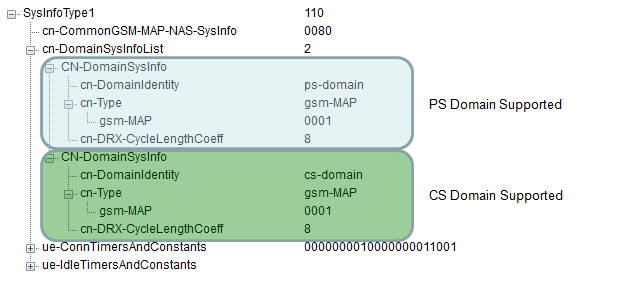
Following SIB1 shows the case where the cell support both CS and PS capability. In this case, usually Registration procedure < Type 1 > in case of Non Combined (NMO II) registration or < Type 3 > in case of Combined (NMO I) is used.
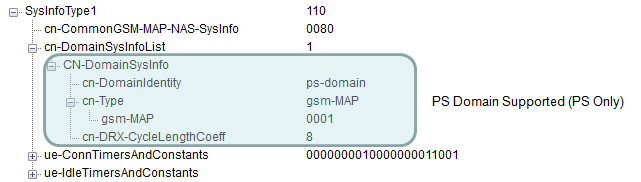
Following SIB1 shows the case where the cell support PS capability only. In this case, usually Registration procedure < Type 3 > is used.
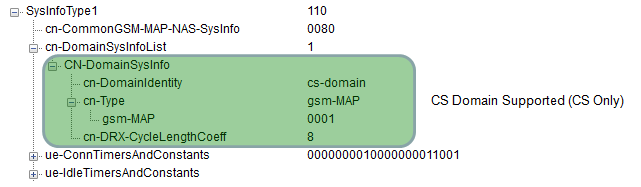
Following SIB1 shows the case where the cell support CS capability only. In this case, usually Registration procedure < Type 2 > is used.
Registration Sequence
< Type 1 >
1) RRC: RRC Connection Request
2) RRC: RRC Connection Setup
3) RRC: RRC Connection Setup Complete
4) RRC: initialDirectTransfer + MM: Location Updating Request
5) RRC : downlinkDirectTransfer + MM:Authentication Request
6) RRC: initialDirectTransfer + GMM: Attach Request
7) RRC : uplinkDirectTransfer + MM:Authentication Response
8) RRC : Security Mode Command
9) RRC : Security Mode Complete
10) RRC : downlinkDirectTransfer + MM:Identity Request
11) RRC : uplinkDirectTransfer + MM:Identity Response
12) RRC : downlinkDirectTransfer + MM:Location Updating Accept
13) RRC : uplinkDirectTransfer + MM:TMSI Reallocation Complete
14) RRC : downlinkDirectTransfer + GMM: AuthenticationAndCipheringRequest
15) RRC : uplinkDirectTransfer + GMM: AuthenticationAndCipheringResponse
16) RRC : Security Mode Command
17) RRC : Security Mode Complete
18) RRC : downlinkDirectTransfer + GMM:Identity Request
19) RRC : uplinkDirectTransfer + GMM:Identity Response
20) RRC : downlinkDirectTransfer + GMM:Attach Accept
21) RRC : uplinkDirectTransfer + GMM:Attach Complete
22) RRC : RRC Connection Release
23) RRC : RRC Connection Release Complete
< Type 2 >
1) RRC: RRC Connection Request
2) RRC: RRC Connection Setup
3) RRC: RRC Connection Setup Complete
4) RRC: initialDirectTransfer + MM: Location Updating Request
5) RRC : downlinkDirectTransfer + MM:Authentication Request
6) RRC : uplinkDirectTransfer + MM:Authentication Response
7) RRC : Security Mode Command
8) RRC : Security Mode Complete
9) RRC : downlinkDirectTransfer + MM:Identity Request
10) RRC : uplinkDirectTransfer + MM:Identity Response
11) RRC : downlinkDirectTransfer + MM:Location Updating Accept
12) RRC : uplinkDirectTransfer + MM:TMSI Reallocation Complete
13) RRC : RRC Connection Release
14) RRC : RRC Connection Release Complete
< Type 3 >
1) RRC: RRC Connection Request
2) RRC: RRC Connection Setup
3) RRC: RRC Connection Setup Complete
4) RRC: initialDirectTransfer + GMM: Attach Request
5) RRC : downlinkDirectTransfer + GMM: AuthenticationAndCipheringRequest
6) RRC : uplinkDirectTransfer + GMM: AuthenticationAndCipheringResponse
7) RRC : Security Mode Command
8) RRC : Security Mode Complete
9) RRC : downlinkDirectTransfer + GMM:Identity Request
10) RRC : uplinkDirectTransfer + GMM:Identity Response
11) RRC : downlinkDirectTransfer + GMM:Attach Accept
12) RRC : uplinkDirectTransfer + GMM:Attach Complete
13) RRC : RRC Connection Release
14) RRC : RRC Connection Release Complete