OpenFlow is a technology designed in University / Universities in order to test new ideas on networking algorithms or architecture. Of course, they can test their ideas on a small test environment (e.g, a couple of connected PCs or a single PC with multiple NICs) or using several specifially designed Hardwares (switches and routers). But Scaling would be one of the most important factors in any new networking technologies. You can never guarantee that a new idea proved working well with a small network with a small traffic works the same way in a real life networking environment.
Is there any way to let the researchers verify their idea in real networking environement with real traffic in a campus ? This was the main motivation that created OpenFlow. OpenFlow provides one approach to programmable forwarding in SDN (Software Defined Networking). Its research origins explain the requirements below; they do not make OpenFlow mandatory for every SDN deployment.
- General Requirement
- Technical Background for OpenFlow Switch
- Structure of OpenFlow Switch
- Flow Table and Entries
- OpenFlow Message Types
- How can we check an OpenFlow forwarding problem ?
- Reference
General Requirement
Due to the situations described above, the researchers want to have network components that can provide following features as described in [1]. A campus experiment must change selected traffic behavior while keeping ordinary services usable. The requirements therefore concern both the experiment and the surrounding production network.
- Amenable to high-performance and low-cost implementation
- Capable of supporting a broad range of research
- Assured to isolate experimental traffic from production frame
- Consistent with vendors' need for closed platforms
Consider an illustrative campus trial that changes the path used by traffic from one laboratory. Engineers must identify that traffic before applying an experimental rule to the shared network. Otherwise, a broad match could include unrelated users and change their service as well.
The acceptance test should therefore include ordinary traffic as well as experimental traffic. For this example, compare the selected path, packet loss, and throughput before and after enabling the experiment. Also repeat the test after removing its rules. This checks whether the network returns to its intended behavior, rather than merely proving that the new algorithm runs.
Define the experiment boundary : Specify the ports or packet fields that identify the research traffic.Test the unaffected service : Successful experimental forwarding alone does not demonstrate isolation from ordinary traffic.Check the return to normal operation : Rule removal belongs in the acceptance test alongside rule installation.
Technical Background for OpenFlow Switch
Putting forward requirements are easy, but letting the industry to realize the requirement is not easy. Especially it would be extremely difficult for Academia to change the moviding directions of industry players with big name. As a reconciliation, researchers tried to come up with a solution based on following observation (This is directly quoted from Ref [1]. I am blindly quoting this from the reference to let you get the first-hand feeling from the researchers).
The basic idea is simple: we exploit the fact that most modern Ethernet switches and routers contain flow-tables (typically built from TCAMs) that run at line-rate to implement firewalls, NAT, QoS, and to collect statistics. While each vendor’s flow-table is different, we’ve identified an interesting common set of functions that run in many switches and routers. OpenFlow exploits this common set of functions.
OpenFlow provides an open protocol to program the flow-table in different switches and routers. A network administrator can partition traffic into production and research flows. Researchers can control their own flows - by choosing the routes their packets follow and the processing they receive. In this way, researchers can try new routing protocols, security models, addressing schemes, and even alternatives to IP. On the same network, the production traffic is isolated and processed in the same way as today.
Structure of OpenFlow Switch
Overall structure of OpenFlow Switch described in the whitepaper ([1]) can be illustrated as shown below. The switch contains the forwarding table and a channel to the controller. These functions cooperate, but they handle different traffic and do not perform the same job.
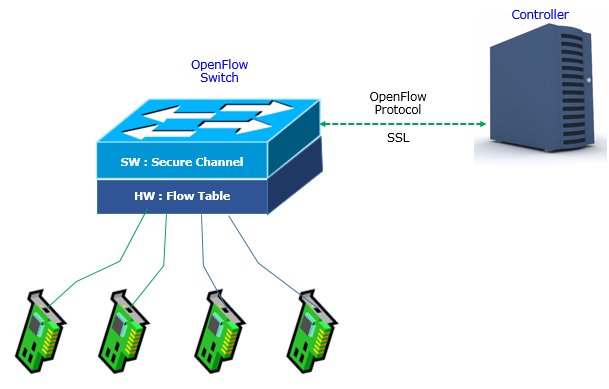
The SW : Secure Channel block connects to the Controller through the dashed OpenFlow Protocol link. The HW : Flow Table block connects to the four network interfaces. This drawing presents a hardware-oriented implementation. An OpenFlow switch can also be implemented in software, as Open vSwitch demonstrates. The controller connection is not the ordinary packet-forwarding path.
The SSL label reflects the historical diagram. OpenFlow 1.5.1 specifies TLS for the secure channel and also permits plain TCP main connections. A live deployment must check its actual transport configuration. The protocol name alone does not establish that control messages are encrypted. See [5].
Open vSwitch also distinguishes in-band and out-of-band controller connectivity. In-band control uses the network under control, so special internal rules can preserve controller reachability. These rules can explain traffic that differs from an ordinary OpenFlow table dump. See [6].
Separate control from forwarding : A controller connection and the switch ports serve different purposes.Check the actual channel : The historical SSL label does not describe every deployment transport.Account for controller reachability : In-band control can introduce implementation-specific forwarding behavior.
Flow Table and Entries
A flow entry describes which packets it matches and what processing follows that match. The illustrated fields also track usage and lifetime, so reading only the forwarding action misses useful information.
< OpenFlow Switch Specfication v1.5.0 - Table 1: Main components of a flow entry in a flow table >
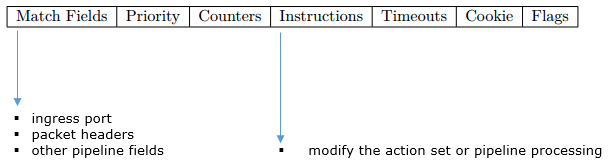
The v1.5.0 Table 1 illustration separates Match Fields from Instructions. Its left arrow lists ingress port, packet headers, and other pipeline fields. Its right arrow identifies changes to the action set or pipeline processing. The other columns answer different operational questions about the same entry.
Priority selects between matching entries; overlapping entries need unambiguous priorities. Counters report usage, while the cookie is a controller-assigned identifier rather than a packet field. An idle timeout expires an inactive entry, whereas a hard timeout expires it regardless of traffic. Zero disables the corresponding timeout. Flags can request removal notifications. See [7].
Instructions control both actions and table traversal. Apply-Actions executes actions immediately; Write-Actions records actions for execution at the end of the pipeline. Clear-Actions empties that deferred set. Goto-Table continues at a higher-numbered table. An immediate output cannot be undone by clearing the deferred action set later. See [8].
How does a packet pass through multiple tables ?
Consider an illustrative two-table policy that admits traffic on one port and then selects its destination. Both tables belong to one switch, so passing between them does not transmit a packet over a physical link.
Figure 1 shows a packet entering Table 0 through port 1. A matching admission rule directs it to Table 1. Table 1 sends a matching destination to port 2. Each table also has an explicit default discard rule, and neither table stores deferred actions in this example.
Figure 1. A packet must satisfy both example lookups before the switch sends it through port 2.
For this example, a packet from port 3 stops at Table 0. A packet from port 1 with another destination stops at Table 1. A packet from port 1 addressed to B reaches port 2. These three cases test admission and destination selection independently. Reverse traffic and address discovery need additional rules; the diagram describes only the stated forwarding policy.
A table match selects instructions : A match in Table 0 alone does not guarantee delivery through an output port.Immediate and deferred actions differ : Check whether an action executes now or enters the action set.Exercise both default rules : Test a rejected ingress port and a rejected destination separately.
OpenFlow Message Types
There are three types of OpenFlow message types as listed below : The distinction tells us who initiates an exchange and why. It does not imply that every request receives a dedicated success reply.
- controller-to-switch message
- asynchronous message
- symmetric message
Controller-to-Switch message : The controller initiates these exchanges; some also include a reply from the switch. The functionality of the messages is to manage or inspect the status of the switch.
|
Message |
Description |
|
|
Features |
Function |
request the identity and the basic capabilities of a switch |
| Response |
reply with the identity and basic capabilities of the switch |
|
|
Configuration |
Function |
set and query configuration parameters in the switch |
| Response | ||
|
Modify-State |
Function |
add, delete and modify flow/group entries in the OpenFlow tables and set switch port properties. |
| Response | ||
|
Read-State |
Function |
collect various information from the switch, such as current configuration, statistics and capabilities. |
| Response | ||
|
Packet-out |
Function |
send packets out of a specified port on the switch, and to forward packets received via Packet-in messages. |
| Response | ||
|
Barrier |
Function |
ensure message dependencies have been met or to receive notifications for completed operations |
| Response | ||
|
Role-Request |
Function |
set the role of its OpenFlow channel, or query that role. This is mostly useful when the switch connects to multiple controllers |
| Response | ||
|
Asynchronous- Configuration |
Function |
set an additional filter on the asynchronous messages or query the filter |
| Response | ||
Asynchronous message : This is the type of message sent from Switch to Controller. The functionality of the message is to update the Controller of network event and changes to the switch status.
|
Message |
Description |
|
|
Packet-in |
Function |
Transfer the control of a packet to the controller |
| Response |
|
|
|
Flow-Removed |
Function |
Inform the controller about the removal of a flow entry from a flow table |
| Response | ||
|
Port-status |
Function |
Inform the controller of a change on a port |
| Response | ||
Symmetric message : This is bidirectional message. It can be either from Switch to Controller or Controller to Switch.
|
Message |
Description |
|
|
Hello |
Function |
this messages are exchanged between the switch and controller upon connection startup |
| Response |
|
|
|
Echo |
Function |
verify the liveness of a controller-switch connection and measure its latency or bandwidth. |
| Response | ||
|
Error |
Function |
notify the other side of the connection of problems. |
| Response | ||
|
Experimenter |
Function |
provide a standard way for OpenFlow switches to offer additional functionality within the OpenFlow message type space |
| Response | ||
The tables provide representative message families, rather than an exhaustive version-by-version catalog. Hello negotiates a common protocol version before normal exchanges begin. Features then identifies the switch and its basic capabilities. Flow-Mod changes installed entries, while Packet-out processes a supplied or buffered packet without necessarily installing a rule. See [5].
A blank Response cell should not be read as an unconditional promise of success. For example, a rejected modification can produce an Error message. Barrier replies establish processing order, but they do not prove end-to-end packet delivery.
Asynchronous notifications also depend on configuration. In Open vSwitch, Flow-Removed requires the relevant entry flag, and message delivery depends on the connection role and filters. An absent notification therefore does not by itself prove that no switch event occurred. See [9].
Separate packet and rule operations : Packet-out can release a packet without creating a persistent forwarding entry.Read errors with the request : A live controller connection does not mean that every modification succeeded.Check notification settings : Roles, filters, and entry flags affect which events reach a controller.
How can we check an OpenFlow forwarding problem ?
A connected controller can still program a rule that fails to match the intended traffic. Start with one reproducible packet and compare its ingress port, headers, and selected actions against the intended policy.
On an existing Open vSwitch lab bridge named br0, the following commands inspect ports and installed flows. They use OpenFlow 1.3 explicitly, so the bridge must allow that version. Replace br0 with the actual lab bridge name. OpenFlow versions supported by the switch and enabled by a command-line client can differ. See [6].
ovs-ofctl -O OpenFlow13 show br0
ovs-ofctl -O OpenFlow13 dump-flows br0
Map the observed ingress interface to its OpenFlow port number before reading the match fields. Then compare the winning rule, its priority, and its packet counter with the test packet. A zero counter suggests a different ingress path or match, but counters alone cannot prove destination delivery.
The ofproto/trace tool follows a specified packet through the Open vSwitch pipeline without sending that packet to its destination. This example supplies port 1 and a destination MAC address. Unspecified packet fields default to zero, so supply further fields when the policy depends on them. See [10].
ovs-appctl ofproto/trace br0 in_port=1,dl_dst=02:00:00:00:00:02
Compare the trace result with a real packet capture at the selected output interface. If the trace chooses the expected port but the host receives nothing, inspect the link and receiver. This separates a lookup error from a problem beyond the switch pipeline.
Confirm the protocol version : Use a version accepted by both the bridge and the inspection client.Trace the actual packet fields : Missing fields in a synthetic trace can select a different rule.Verify delivery separately : A pipeline trace explains a forwarding decision; a capture checks actual traffic.
Reference
[1] OpenFlow: Enabling Innovation in Campus Networks
[2] OpenFlow Switch Specification - Version 1.5.0 ( Protocol version 0x06 ), December 19, 2014
[3] OpenFlow Switch Specification - Version 1.4.0 (Wire Protocol 0x05), October 14, 2013
[4] OpenFlow Switch Specification - Version 1.0.0 (Wire Protocol 0x01),December 31, 2009
[5] ONF TS-025 : OpenFlow Switch Specification v1.5.1; selected passages in Sections 6.1-6.3.
[6] OVS OpenFlow FAQ : Open vSwitch - Using OpenFlow; protocol selection and in-band control passages.
[7] ovs-ofctl(8) : Open vSwitch - flow syntax, priorities, cookies, timeouts, and flags.
[8] ovs-actions(7) : Open vSwitch - instructions, action sets, and Goto-Table passages.
[9] OVS Design Decisions : Open vSwitch - Asynchronous Messages section.
[10] OVS Packet Tracing : Open vSwitch - Tracing packets inside Open vSwitch; Packet Tracing section.