Wi-Fi 7, technically known as IEEE 802.11be, is the wireless network standard that IEEE-SA approved as IEEE 802.11be-2024. It builds upon the features introduced by Wi-Fi 6 and Wi-Fi 6E by substantially increasing bandwidth, supporting 320 MHz channels in the 6 GHz band. This enhancement effectively doubles the channel width compared to Wi-Fi 6/6E.
The standard incorporates 4K Quadrature Amplitude Modulation (QAM), which allows for more data to be transmitted with each signal compared to the 1K QAM of Wi-Fi 6. It also introduces Multi-Link Operation (MLO), which enables simultaneous data transmission across multiple frequencies, improving throughput, reliability, and reducing latency.
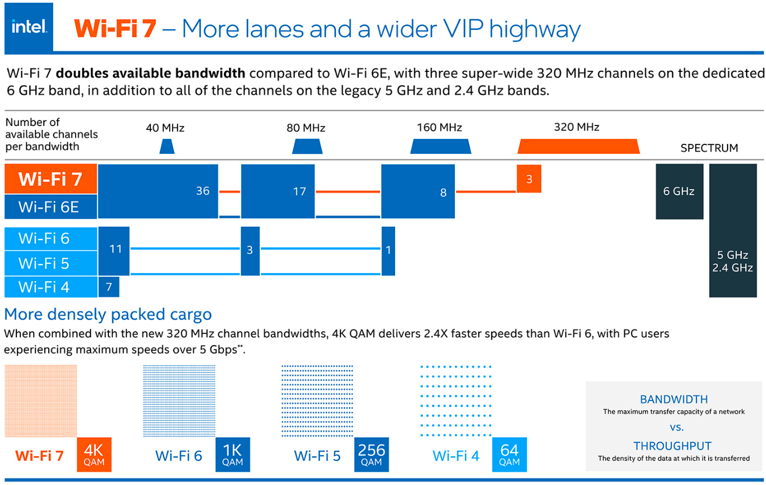
The Intel graphic below makes the same two points with pictures. The upper half counts the channels of each width. Wi-Fi 7 and Wi-Fi 6E share the 6 GHz band, and only Wi-Fi 7 gets the three 320 MHz channels, drawn in orange. The lower half shows the constellations, from 64 QAM for Wi-Fi 4 up to 4K QAM for Wi-Fi 7.
Source : What Is Wi-Fi 7? - Intel
Figure 1. Wi-Fi 7 in one picture. The 320 MHz channel doubles the bandwidth, and 4K QAM packs 20 percent more bits into each subcarrier.
Channel count : in the upper half, Wi-Fi 7 and Wi-Fi 6E have 36, 17 and 8 channels of 40, 80 and 160 MHz. Wi-Fi 7 adds 3 channels of 320 MHz. Wi-Fi 6 and Wi-Fi 5 have 11, 3 and 1, and Wi-Fi 4 has 7.Why only three 320 MHz channels : the 6 GHz band is about 1200 MHz wide, and 1200 / 320 = 3.75. So only three whole 320 MHz channels fit.The 2.4X claim : the text says 4K QAM with 320 MHz gives 2.4X the speed of Wi-Fi 6. That is exactly 2 for the bandwidth times 12 / 10 = 1.2 for the modulation.Bandwidth vs. Throughput box : Intel separates the capacity of the network from the density of the data. The upper half is about the first and the lower half is about the second.
- What are the highlights of WiFi 7 ?
- How much faster is 802.11be than 802.11ax ?
- What does Multi-Link Operation change ?
- References :
- YouTube
What are the highlights of WiFi 7 ?
The table below lists the Wi-Fi 7 features one per row. Most rows describe what the standard allows, not what a typical device does. So read the table as the upper limits of Wi-Fi 7, and check the later sections for what each limit means in practice.
Highlights of WiFi 7 (802.11be) can be summarized as follows :
|
Feature |
Description |
|---|---|
|
Maximum Data Rate |
Up to 36 Gbps |
|
Frequency Bands |
2.4 GHz, 5 GHz, and 6 GHz |
|
Channel Width |
Up to 320 MHz |
|
Modulation |
4096 QAM |
|
Spatial Streams |
Up to 8 spatial streams |
|
Multi-Link Operation (MLO) |
Simultaneous use of multiple frequency bands for data transfer |
|
Multiuser Resource Units |
Efficient smaller subchannels within standard channel widths |
|
Automated Frequency Coordination (AFC) |
Avoids interference with incumbent users of the 6 GHz band |
|
Backwards Compatibility |
Compatible with earlier Wi-Fi standards |
|
Spectrum Efficiency |
Enhanced efficiency in data transmission |
|
Connectivity in Dense Environments |
Improved performance with multiple devices |
|
Connection Reliability |
Stable and reliable connections |
Two rows of the table need a comment. The Spatial Streams row said 16 streams in an earlier version of this page. Early drafts of 802.11be did plan for 16 streams, but that was removed from the specification in 2024, and the approved standard stays at 8 streams. The Maximum Data Rate row, 36 Gbps, is a figure that many articles repeat. But one link cannot reach it, as the next section computes. It can only be reached when several links are added together. The page does not say how the 36 Gbps was derived, so treat it as an aggregate figure.
Bandwidth and modulation give the peak rate : 320 MHz and 4096 QAM are the two PHY changes behind the higher numbers.MLO and multiple RUs give the efficiency : these features change how a device uses the channels, not how fast one channel runs.AFC concerns the 6 GHz band : an AP checks with a coordination system before it uses 6 GHz at higher power, so it does not interfere with incumbent users.
How much faster is 802.11be than 802.11ax ?
Let's compute the peak rate instead of trusting the headline numbers. 802.11be keeps the numerology of 802.11ax: a subcarrier spacing of 78.125 kHz, a 12.8 microseconds useful symbol, and a guard interval of 0.8, 1.6 or 3.2 microseconds. So only two terms of the rate formula change. The channel can be twice as wide, and each subcarrier can carry 12 bits instead of 10.
A 320 MHz channel carries 3920 data subcarriers, twice the 1960 of a 160 MHz channel. With 4096 QAM at rate 5/6 and the 0.8 microseconds guard interval, one stream gives 3920 x 12 x 5/6 / 13.6 microseconds = 2882 Mbps. The table below compares this with the best case of 802.11ax.
Case |
Channel |
Modulation, rate |
Per stream |
8 streams |
802.11ax, MCS 11 | 160 MHz | 1024 QAM, 5/6 | 1201 Mbps | 9.6 Gbps |
802.11be, MCS 13 | 320 MHz | 4096 QAM, 5/6 | 2882 Mbps | 23.1 Gbps |
The ratio is 2882 / 1201 = 2.4, the same 2.4X that the Intel graphic above quotes. It splits into 2 for the bandwidth and 1.2 for the modulation. So the peak rate of one 802.11be link is about 23 Gbps. If the 36 Gbps in the table were a single-link number, it would need about 12.5 streams, which the standard does not have. With the removed 16 stream option, the peak would have been 46 Gbps.
Keep the cost of 4096 QAM in mind. A square QAM needs about 10 log10(4095 / 1023) = 6.0 dB more SNR than 1024 QAM for the same error rate. So MCS 12 and 13 work only on a very clean link, usually with the device close to the AP. The Intel graphic says the same thing in practical terms. It promises PC users more than 5 Gbps, not 23 Gbps.
Two changes, 2.4 times the rate : 2 from 320 MHz and 1.2 from 4096 QAM, with the numerology of 802.11ax unchanged.One link peaks at about 23 Gbps : 8 streams of 2882 Mbps each.4096 QAM needs 6 dB more SNR : the top MCS values are for short, clean links.
What does Multi-Link Operation change ?
Up to Wi-Fi 6E, a station connects to an AP on one channel in one band at a time. If that channel is busy or noisy, the station waits, even when another band of the same AP is free. Multi-Link Operation removes this limit. A Wi-Fi 7 device can hold links in the 2.4, 5 and 6 GHz bands at the same time, and it can send and receive data over them together. MLO is mandatory for Wi-Fi 7 certification.
MLO helps in two ways. The first is throughput, because the rates of several links add up. The second is latency and reliability. A frame can go out on whichever link is free first, so one busy channel no longer blocks the traffic. For many users the second effect matters more than the first.
Two other features work in the same direction, inside one channel. Preamble puncturing lets a device block the part of a wide channel that has interference and keep using the rest. Without it, interference in one 20 MHz part could make the whole wide channel unusable. Multiple Resource Units extend the OFDMA of Wi-Fi 6, so the AP can give one user more than one RU. Both features are mandatory for Wi-Fi 7 certification, while 4096 QAM and 320 MHz are optional. So a device can be Wi-Fi 7 certified without the two features that produce the headline rate.
MLO uses several bands at once : the rates add up, and traffic can use whichever link is free.Puncturing saves a wide channel from local interference : only the affected part is blocked.Mandatory and optional features differ : MLO, puncturing and multiple RUs are mandatory for certification, while 4096 QAM and 320 MHz are optional.
References :
- IEEE 802.11be Extremely High Throughput: The Next Generation of Wi-Fi Technology Beyond 802.11ax (Sep 2019)
- What Is Wi-Fi 7? - Intel
- Wi-Fi 7 - TechTarget/Networking
- What is Wi-Fi 7: Everything you need to know about 802.11be - digitaltrends (2023)
- Wi-Fi 7 (Wikipedia) , core features, certification status and rate table
YouTube
- WiFi 7; Leveraging 6 GHz Spectrum (Apr 2020)
- WiFi 7 ; PHY rate increase (Dec 2020)
- Introducing IEEE 802.11be: The Wi-Fi of the future (Dec 2020)
- IEEE 802.11be: Wi-Fi Strikes Again (Jan 2021)