In this page, I will give you snapshots for various way of using MT8862 for your development and verification or study purpose. You would get various formal document from Anritsu MT8862 product page but in this page I am trying to give you some idea on how I like to play with these toys :)
The six setups below fall into two groups. Cases A to D show how the MT8862A takes the role of an Access Point or a Station, with or without a separate sniffer. Cases E and F use the same connection to measure the transmitter and the receiver of the DUT.
How is the MT8862 connected to the DUT ?
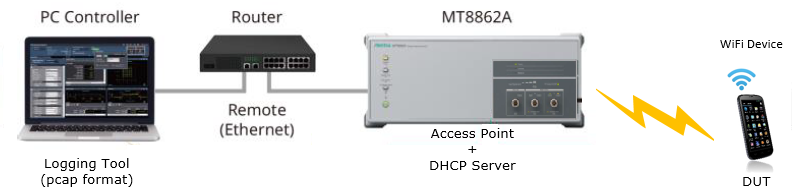
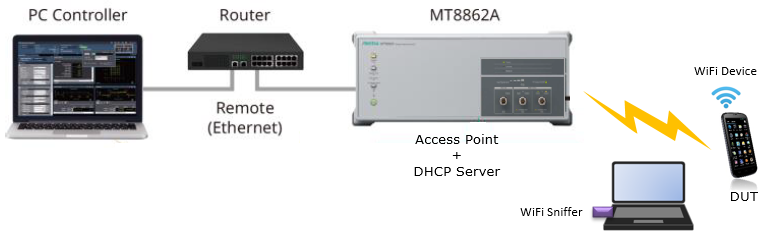
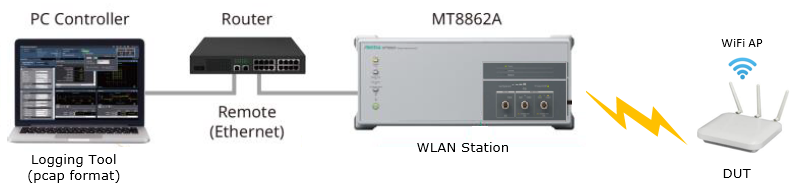
Cases A to D all use the same control path. A PC Controller runs the software and reaches the MT8862A through a router over Ethernet. What changes from case to case is the role the MT8862A plays over the air, and whether a separate sniffer listens to the air interface.
Case A
In Case A, the MT8862A acts as the Access Point and also as the DHCP server, and the DUT is a WiFi device such as a phone. The PC Controller runs a logging tool that records the traffic in pcap format, so you can open the log later in Wireshark. This is the basic setup for checking how a phone connects to an AP.
Case B
Case B adds a WiFi Sniffer, which is a laptop with a WiFi adapter placed near the DUT. The MT8862A is still the Access Point and DHCP server. The sniffer records the frames as they appear on the air, separate from the tester. This helps when you need to see exactly what the DUT sent and when.
Case C
Case C reverses the roles. The MT8862A acts as a WLAN Station, and the DUT is a WiFi AP. This setup tests an AP product rather than a client device, and the PC Controller again records the traffic in pcap format.
Case D
Case D is Case C with a WiFi Sniffer added next to the DUT AP. It extends Case C in the same way that Case B extends Case A.
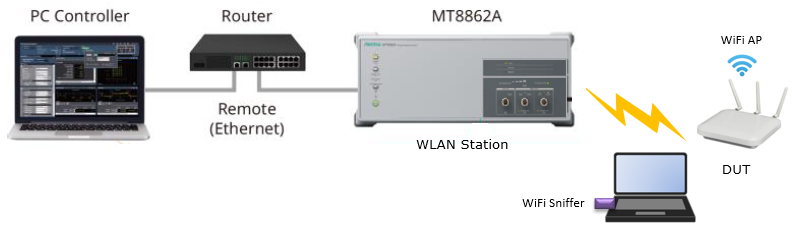
The control path never changes : the PC Controller always reaches the MT8862A over Ethernet through a router.The MT8862A takes the opposite role of the DUT : it is the Access Point for a phone and the Station for an AP.A separate sniffer gives an independent view : it records the air interface without relying on the tester's own log.
What can be measured with the MT8862 ?
Cases E and F measure the RF performance of the DUT while a connection is running. In both, the MT8862A can act as the Access Point or the Station. Case E measures the transmitter of the DUT, and Case F measures its receiver.
Case E
In Case E, the MT8862A sends a Ping Request, and the DUT answers. The tester measures the frames that the DUT sends back. The diagram labels the answer "Packet Replay", which should read "Packet Reply". The results appear on the PC Controller in four views: a spectrum, a power vs time trace, an IQ constellation, and a table of numerical results.

- The spectrum view shows the occupied band of the DUT signal, with a flat top and steep edges.
- The power vs time view shows one burst from the DUT with a flat power level.
- The IQ Constellation view shows the received QAM points of the data symbols.
- The Numeric Result table lists EVM, Center Frequency Tolerance, Symbol Clock Frequency Tolerance and IQ Imbalance. The EVM RMS of -35.16 dB is the same as 1.75 %, because 10 to the power of -35.16 / 20 is 0.0175.
Case F
In Case F, the MT8862A sends Test Packets and counts the Ack Frames that come back from the DUT. The DUT sends an ACK only for a packet it decoded, so a missing ACK counts as a lost packet. The tester lowers the level step by step and plots PER (Packet Error Rate) and FRR (Frame Rx Rate) against the level in dBm. The diagram labels the tester role as "Statuib", which is a typo for Station.
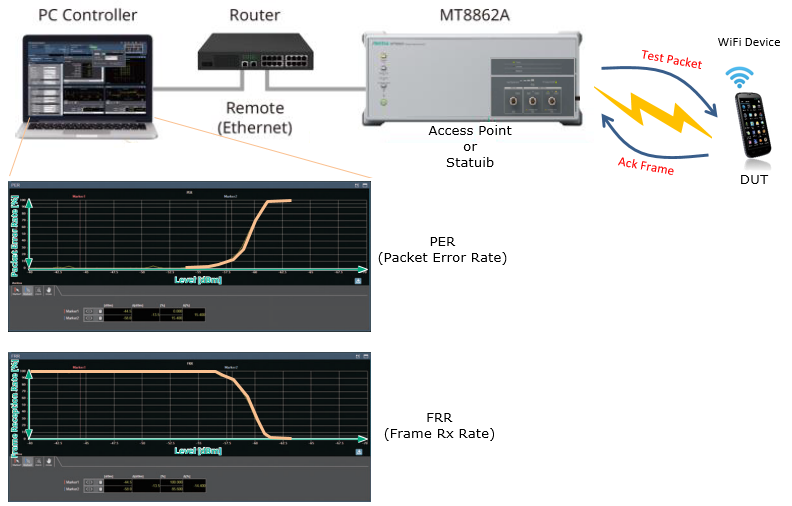
- The PER curve stays near zero at high levels and then rises steeply to 100 % over a few dB.
- The FRR curve is the mirror image. It stays at 100 % at high levels and falls to zero over the same few dB.
Case E tests the DUT transmitter : the tester triggers traffic with a ping and measures the frames the DUT sends back.Case F tests the DUT receiver : the ACK from the DUT tells the tester whether each test packet was received.The receiver limit shows as a steep step : the level where PER starts to rise is the practical sensitivity of the DUT for that rate.