This is an introduction page for a drive test tool AZQ Anroid from Azenqos. What I am posting here is based on my personal experience with the tool. If you want to get the official information from the company, visit Azenqos home.
The tool comes in three parts, and this page uses one of them. The list at the end links to every live network measurement on this site that came out of it, so the page is also an index to those examples.
- What are the three parts of the tool ?
- What matters in a drive test tool ?
- Sample Data in Sharetechnote
- Reference
What are the three parts of the tool ?
A drive test tool is rarely one program. Collecting, storing and reading the data are different jobs with different machines behind them, and the picture below shows how Azenqos splits them.
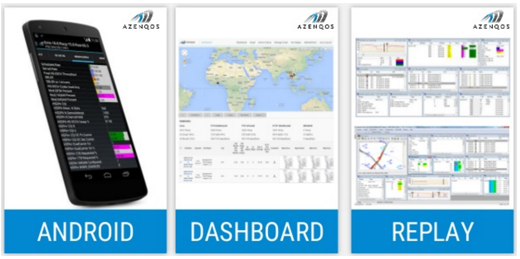
- The panel on the left is captioned ANDROID. It is the collector: a phone running the app, with a list of measurements down the screen and several rows highlighted in colour.
- The middle panel is captioned DASHBOARD. It is a browser view, with a world map carrying markers at the top and a table of logged sessions with chart thumbnails below it.
- The panel on the right is captioned REPLAY. It is a desktop application showing several panes at once: charts at the top left, a map with a coloured route through the middle, and tables and bar charts down the right.
- All three panels carry the AZENQOS logo in the top corner, so the picture is the vendor's own summary of the product rather than a screenshot of one drive.
The split matters for everything that follows. The measurements and the signalling messages are recorded on the phone, so the collector is the part that decides what a log can contain. The dashboard and the replay tool are ways of reading a log after the drive, and a log that has been exported can be read by anything.
Collection and analysis are separate : the phone records, and the dashboard and the replay tool read what it recorded.The picture is the vendor's own : all three panels carry the AZENQOS logo, so it shows the product rather than one drive.Only the collector matters for the list below : the phone produced every measurement in that list, and the post processing produced none of them.
What matters in a drive test tool ?
Two questions decide whether a drive test tool is worth using, and neither of them is about how its built in charts look. The two criteria below put the weight on what comes out of the tool rather than on what it shows on screen.
For me personally, the most important criteria about this kind of tool is as follows
i) how much information (raw data) it can collect
ii) can I export all the raw data into external text file (e.g, csv, txt, JSON etc)
Personally I don't care much about the report format from the tool itself because every end user would have their own requirement and in most cases those requirements are different person to person. It is almost impossible to come up with any common report format or charts that statisfies everybody.
If a tool can collect all the raw data that I need and allow me to export it into txt or csv, I can use Microsoft Excel, Python, Matlab or whatever tool that I can utilize and process the data in my personal needs.
With this criteria, AZQ Android captures almost all of what I want to get from live network not only a lot of measurement result but also higher layer signaling message (RRC/NAS) which is very important that allows me to correlate the measurement result to what's happening in higher layer signaling events.
Raw data serves more people than a report does : a report format answers one person's requirement, and an exported file answers everybody's.Export is what makes the rest possible : a csv or a text file opens in Excel, Python or Matlab, and each of those does what a fixed chart cannot.Logging the signalling too is the rarer capability : a measurement on its own says what happened, and the RRC and NAS messages logged beside it say why.
Sample Data in Sharetechnote
The list below is an index rather than a section. Every entry links to a page on this site where one live network measurement is worked through, and every one of those measurements was logged with this tool. They are processed data: the logs have been read and plotted rather than reproduced raw.
Followings are the examples of data from AZQ Android. You will see various data/information provided by the tool and see how you can use those data/information to understand LTE protocol. I will keep expand the list as I learn more from the tool.
- RSRP, RSRQ, RSSI, SINR Interplay - Example 1 > RSRP/RSRQ/SINR at relatively stationary environment
- RSRP, RSRQ, RSSI, SINR Interplay - Example 2 > RSRP/RSRQ at driving/handover situation
- RSRP, RSRQ, RSSI, SINR Interplay - Example 3 > : RSRP/RSRQ/RSSI/SINR at driving/handover situation
- SNR/SINR - Example > SNR (SINR) vs Throughput in a LTE Live Network
- LTE Measurement : Example 2 > - Event Based Measurement : A1, A2, A3
- LTE Measurement : Example 3 > - Event Based Measurement : A5
- CQI - Example 1 > Throughput, CQI, BLER while driving on a highway
- CQI - Example 2 > CQI vs MCS
- CQI, PMI, RI Reporting Configuration - Details for Periodic Report : Example 1 - Live Network Example
- LTE MIMO - Rank Indicator : Example 1 > RI Report from a drive test on a High Way under 2x2 TM3
- Transmission Mode : Example 1 > Transmission Mode changes while driving in live network
- LTE Timing Advance - Example 1 > Timing Advance in a Live Network (in the field)
- RLC Factors on LTE throughput : Example 1 > PHY throughput and RLC Throughput in a drive test
Thirteen entries sit in the list, and they divide into four groups. Scanning the four groups is quicker than scanning the thirteen titles.
Four entries cover signal quality : three take RSRP, RSRQ, RSSI and SINR together, and the fourth takes SNR against throughput.Two cover event based measurement : A1, A2 and A3 in one, and A5 in the other.Four cover the feedback loop : two on CQI, one on the periodic reporting configuration, and one on the rank indicator.Three cover what the network does with the feedback : transmission mode changes, timing advance, and RLC throughput against PHY throughput.
Reference
This page describes a commercial tool rather than a specification, so there is no 3GPP document behind it. The link below is the source the page itself names.
- azenqos.com : Azenqos, the vendor of AZQ Android. Named on this page as the place to get official information about the tool. Not read for this page.