IP testing is one name for several different tests. This page is about the one that has to succeed before any of the others can run. That test is getting an address onto the device, and every test above it depends on the result.
What pops up in your mind when you hear about 'IP Testing' ?
Some body may think about Throughput Testing, somebody think about Browsing and some others would think of IMS /RCS kind of testing.
Yes, they are all based on IP layer and each of them has very long story of their own. I have completely separate pages of the topics like throughput and IMS. In this page, I will talk about rather fundamental, probably the most fundamental and critical for any IP related functionality. I will talk about testing 'IP allocation' or 'IP establishment'.
Many people take this step as granted and when they get a device (UE) for a test, they tend to assume that this process will be done automatically in any situation and they don't have to care about it, but it is COMPLETELY WRONG assumption.
You would see (or already has expienced) a lot of cases where the problem happens at this IP assignement (data path establishment) step even before you think about higher layer application like ftp software or IMS stack etc.
To make things even worse, if some problem happens at this step, the troubleshooting is not that simple. Why ?
Following illustration shows my personal impression (based on many years of experience) on why IP/Application layer testing/troubleshooting is more difficult comparing to other lower layer testing.
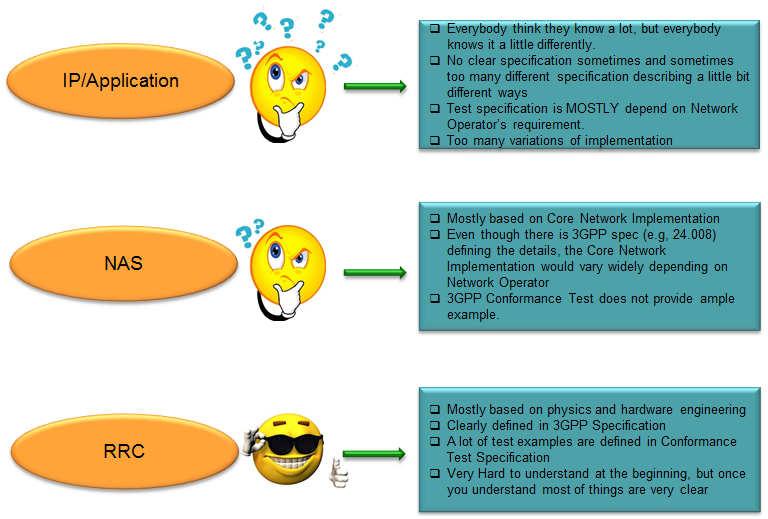
Why testing and troubleshooting at this stage is so difficult ? I don't know if you might have noticed it from the illustration above or not. It is not because it is like rocket science (requiring a lot of physics, math and all different kind of high end engineering technique) but because most people just start testing without clear definition of test requirement and procedure. It may sound funny but they just trying testing without clearly understanding what to test.
As indicated in the illustration above, so many different variation of implimentation is allowed but no single UE implements all those possible variation. Usually a specific UE implements only a specific subset of all the possible variation. So if a UE implements based on a subset 'A' and the test case specification is described based on subset 'B'. The UE would fail in the test. It is not because UE implementation is wrong. It is not because the test case description is wrong. It is because UE implementation and test case requirement doesn't match.
Another serious problem (I think this is even more serious). Not so many testers are fully informed about exact UE implementation and what is capable and what is not capable. In most case, I saw there are very wide barrier between testing people and IP stack developers. They were just given a device and asked to test without the detailed information. So it is likely that the testing people would try to test the device based on wrong test condition (test spec)
Check List on UE side
My suggestion is to make a check list as in detail as possible and check if you have the answers to all the items in the list and check if the test case document specifies about all the check items before you start testing.
If you are missing with any of the check items required for a specific test, then the troubleshooting would be more like random try and error, or just blackbox analysis. You would get it work or not purely based on how lucky you are. It is nothing to do with your engineering skill or intelligence.
In this page, I will start out creating some check list and this list would get longer. (This is the check list only for basic IP setup, there would be another long list of check list if you go with any specific application. For example, you can get another long list of check items here if you do IMS related testing)
|
No |
Check Item |
Comment |
|
1 |
Does UE allow user to create their own APN setting ? |
Some commercial UE has just hardcoded APN setting and does not allow user to change or create new one |
|
2 |
Does UE support IPv4 ? |
|
|
3 |
Does UE support IPv6 ? |
|
|
4 |
Does UE support IPv4V6 ? |
|
|
5 |
How many PDN (or PDP) can the UE create ? |
|
|
6 |
Does the UE allows user to set any APN name ? |
Some UE allows only some specific APN name for a specific PDN |
|
7 |
Does the UE allows any test USIM ? or require any specific test specification (e.g, the ones provided by specific Operator) ? |
|
|
8 |
Does UE requires USIM to set a specific value for a specific item ? |
e.g > GBA Setting |
|
9 |
Does UE requires any specific Authentication Algorithm ? |
e.g > Milenage |
|
10 |
Does UE requires any specific Service Layer Authentication ? |
e.g > GBA |
|
11 |
Does UE support feature to display IP address assigned to itself ? |
|
|
12 |
Does UE accept any APN name assigned by Network ? |
Most UE accept any APN name assigned by NW, but some UE accept only the name it specified in "PDN Connectivity Request" |
|
13 |
Does UE require any specific configuration on application server to initiate a specific service (e.g, browsing) |
Some UE mandate a specific file located in a specific folder in an application server (e.g, http) to initiate the service |
Three questions are missing from that list, and all three decide whether a test case can be written at all. Each has an answer in a specification. For two of the three, that answer is that the specification does not choose.
The first is whether the UE sends a Router Solicitation. 23.401 clause 5.3.2.1 says the UE can wait for the Router Advertisement or may send a Router Solicitation if necessary. A UE that never solicits is therefore conformant, and a test case that requires the solicitation will fail it for no reason.
The second is what the UE does when the Router Advertisement never arrives. RFC 4861 section 10 fixes both of the numbers in front of that moment: MAX_RTR_SOLICITATIONS is 3 and RTR_SOLICITATION_INTERVAL is 4 seconds. It says nothing about what follows, and the 3GPP specifications say nothing either. The two failure cases further down this page show two different answers.
The third is what the UE does with a single address grant. 24.301 clause 6.5.1.3 requires an ESM cause of 50, 51 or 52 whenever the network answers an IPv4v6 request with one family. Clause 6.2.2 then splits the three. After 50 or 51 the UE must not ask again for the refused family until one of a short list of events happens. After 52 it should open a second PDN connection for that family.
Add the Router Solicitation question to the list : 23.401 makes it optional, so the answer is per implementation and the test case has to allow both.Add the advertisement timeout question : the 3GPP specifications define no next move for the UE, and the two diagrams below show a detach and a fallback.Add the ESM cause question : 24.301 requires the cause, and the three causes lead to two different follow-up behaviours.The rest of the list is implementation, not specification : which is why the answers have to come from the device maker rather than from a document.
UE Requirement Examples
Once you got the answers to all the items in the checklist, you can define a list of UE requirement for the test you want to perform. What I am going to do in this section is to present some of the possible examples of UE requirement.
These are just examples to give you an idea. You may not be able to get the real UE in the market that exactly matches these examples.
REQUIREMENT-UE Case 1
This is a UE that is at the top of my wish list. If you have a UE like this, you may be able to do the most of IP related test (except IMS/RCS since I didn't put any requirement on this application) in any combination of IP type. You may be able to have this kind of UE if you are working at a UE maker and get the test UE at development stage, but it would be hard to get the UE with this kind of flexibility from mobile shop. Usually when a UE maker release (commericialize) a UE in the market, they tend to customize (in most case restrict the flexibility) the available feature set requested by a specific network operator and block many of the features that is not required by the specific network operator.
i) UE shall allow user to create their own APN for testing.
ii) UE shall allow to set APN type as any IP type (IPv4, IPv6, IPv4v6)
iii) UE shall allow any APN name for the test
iv) UE shall be able to support at least 2 PDN
v) UE shall provide a tool to display all the IP address assigned to it
vi) UE shall provide a tool to run 'ping' from UE
vii) When a PDN is set to be IPv4v6, UE should send DNS query to both IPv4 and IPv6 DNS Server if NW provided both DNS address.
viii) UE shall allow any Test USIM at least up to IP establishment (UE may require a specific USIM for IMS/RCS)
ix) UE shall accept any APN name Network assigns in Activate Default EPS Bearer Context Request
REQUIREMENT-UE Case 2
The second example drops most of that flexibility and keeps the few items a test still cannot run without. It is worth reading beside the first one, because the difference between them is roughly the difference between a development build and a retail device.
I think this would be more practical requirement and you might have seen this kind of requirement from many of the test case description.
- The first APN : APN Type = IPv4, APN Name = xyz1, Supported service = Internet
- The second APN : APN Type = IPv6, APN Name = xyz2, Supported service = ims
i) UE shall have the predefined two APN as follows
ii) UE shall provide a tool to display all the IP address assigned to it
iii) UE shall allow any Test USIM at least up to IP establishment (UE may require a specific USIM for IMS/RCS)
iv) UE shall NOT detach IPv6 APN even though IMS Registration is not successful.
Note : Many of the test case does not specify about item iv) and a lot of UEs shows different behavior causing a lot of confusion and a lot of difficulties with troubleshooting
A requirement list is a filter, not a wish list : Case 1 describes a development build, and Case 2 describes what a commercial device usually still allows.Item iv of Case 2 is the one that causes arguments : it asks for behaviour no specification defines, which is why the note beside it exists.Two APNs is the smallest useful set : one for internet over IPv4 and one for ims over IPv6, which is what the test cases below assume.A tool that prints the assigned address is not optional : both examples ask for it, because without it the IPv6 cases cannot be verified at the UE at all.
Test Case Examples
In this section, I will give you some examples of possible test cases. I will start out with some test cases for initialization of IP address (and data path) and then add test cases with application and service layer test case.
TC-Case 1 : IPv4 only PDN and Single PDN
The simplest case, and the one to run first. Only IPv4 is involved, so neither a Router Solicitation nor a Router Advertisement appears anywhere in the sequence. The address arrives complete in the NAS message, and nothing after the attach has to happen for the UE to be reachable.
- PDN Type = IPv4 or IPv4v6
- Access Point Name = Any (Omit is also allowed)
- Protocol Configuration Option
- DNS Server IPv4
- AccessPointName = xyz
- Protocol Configuration Option
- DNS IPv4 Address
- PDN Type = IPv4
- PDN Address Information = [A specific Network Interface ID] e.g> C0A80147
- UE IP : As assinged at Step iv)
i) Setup Test Equipment with the Parameter Setting XYZ
ii) Power on UE and let UE initiate the attach process for the network.
iii) Verify UE send PDN Connectivity Request (piggybacked in RRC Connection Setup Complete) with the following IEs
iv) Verify Network send Activate Default EPS Bearer Context Reqest with following IEs
v) Complete Attach/Registration Process
vi)Verify UE assigned following IP address to itself
The PDN address holds a whole IPv4 address here : 24.301 clause 9.9.4.9 puts it in octets 4 to 7, so C0A80147 is the entire field and it reads 192.168.1.71.Router discovery has no part in this case : nothing in the sequence needs ICMPv6, which is what makes it the one to run first.Step iii allows the UE to ask for more than IPv4 : a network that then answers IPv4 has to send an ESM cause with it, under 24.301 clause 6.5.1.3.
TC-Case 2 : IPv6 only PDN and Single PDN
IPv6 alone, and this is where half of the address starts arriving over a different protocol. The NAS message carries an interface identifier and no prefix, so the test is not finished when the attach is. Two ICMPv6 steps follow it.
- PDN Type = IPv6 or IPv4v6
- Access Point Name = Any (Omit is also allowed)
- Protocol Configuration Option
- DNS Server IPv6
- AccessPointName = xyz
- Protocol Configuration Option
- DNS IPv6 Address
- PDN Type = IPv6
- PDN Address Information = [A specific Network Interface ID] e.g> 0000000000000001
- Prefix : [A specific Prefix ID] e.g, 2001:0:0:2::
- Prefix : As assinged at Step vii)
- Interface ID : As assinged at step iv)
i) Setup Test Equipment with the Parameter Setting XYZ
ii) Power on UE and let UE initiate the attach process for the network.
iii) Verify UE send PDN Connectivity Request (piggybacked in RRC Connection Setup Complete) with the following IEs
iv) Verify Network send Activate Default EPS Bearer Context Reqest with following IEs
v) Complete Attach/Registration Process
vi) UE send Router Solicitation
vii) Network send Router Advertisement
viii) Verify UE assigned following IP address to itself
The NAS message carries eight octets, not sixteen : 24.301 clause 9.9.4.9 calls octets 4 to 11 an IPv6 interface identifier, so 0000000000000001 is an identifier rather than an address.Step vi is optional for the UE : 23.401 clause 5.3.2.1 lets the UE wait for the advertisement instead of soliciting it, so a UE that never sends step vi still passes.The two halves come from two different messages : the prefix from step vii and the interface identifier from step iv, which is what step viii is checking.The identifier is the only part the network can insist on : 23.401 clause 5.3.1.2.2 requires it for the link local address and leaves the global one to the UE.
TC-Case 3 : IPv4v6 PDN and Single PDN
Both families at once. The field worth watching is the PDN address, which now carries twelve octets rather than four or eight. Their order is easy to get wrong, and getting it wrong configures the test equipment to send an address the UE cannot use.
- PDN Type = IPv4v6
- Access Point Name = Any (Omit is also allowed)
- Protocol Configuration Option
- DNS Server IPv4
- DNS Server IPv6
- AccessPointName = xyz
- Protocol Configuration Option
- DNS IPv4 Address
- DNS IPv6 Address
- PDN Type = IPv4v6
- PDN Address Information = [A specific Network Interface ID] e.g> 0000000000000001C0A80147
- Prefix : [A specific Prefix ID] e.g, 2001:0:0:2::
- UE IP : As assinged at Step iv)
- Prefix : As assinged at Step vii)
- Interface ID : As assinged at step iv)
i) Setup Test Equipment with the Parameter Setting XYZ
ii) Power on UE and let UE initiate the attach process for the network.
iii) Verify UE send PDN Connectivity Request (piggybacked in RRC Connection Setup Complete) with the following IEs
iv) Verify Network send Activate Default EPS Bearer Context Reqest with following IEs
v) Complete Attach/Registration Process
vi) UE send Router Solicitation
vii) Network send Router Advertisement
viii) Verify UE assigned following IP address to itself
IPv4
IPv6
24.301 clause 9.9.4.9 sets that order. For PDN type IPv4v6 the PDN address information runs from octet 4 to octet 15. Octets 4 to 11 hold the IPv6 interface identifier, and octets 12 to 15 hold the IPv4 address. The identifier comes first.
24.008 clause 10.5.6.4 reverses that order. In the packet data protocol address of a GPRS session the IPv4 address sits in octets 5 to 8 and the IPv6 address follows it. Most people meet the GPRS clause first, and writing its order into an LTE test case puts the octets in the wrong place.
The field is twelve octets and the identifier leads : 0000000000000001 then C0A80147, under 24.301 clause 9.9.4.9.The GPRS order is the reverse : 24.008 clause 10.5.6.4 puts the IPv4 address first, which is where the mistake usually comes from.An IPv4 address of 0.0.0.0 is not an error : the same 24.301 clause codes it that way when DHCPv4 is to be used instead.No ESM cause means the dual request succeeded : 23.401 clause 5.3.2.1 says the UE treats an interface identifier beside an IPv4 address, with no cause, as a dual address grant.
TC-Case 4 : IPv6 and RA Failure
The first of the two failure cases. Everything up to the attach succeeds, and then the Router Advertisement never arrives. That leaves the UE holding an interface identifier and no prefix, which is an incomplete address and not a usable one.
- PDN Type = IPv6 or IPv4v6
- Access Point Name = Any (Omit is also allowed)
- Protocol Configuration Option
- DNS Server IPv6
- AccessPointName = xyz
- Protocol Configuration Option
- DNS IPv6 Address
- PDN Type = IPv6
- PDN Address Information = [A specific Network Interface ID] e.g> 0000000000000001
i) Setup Test Equipment with the Parameter Setting XYZ
ii) Power on UE and let UE initiate the attach process for the network.
iii) Verify UE send PDN Connectivity Request (piggybacked in RRC Connection Setup Complete) with the following IEs
iv) Verify Network send Activate Default EPS Bearer Context Reqest with following IEs
v) Complete Attach/Registration Process
vi) follow the steps (3)~(6) as shown below.
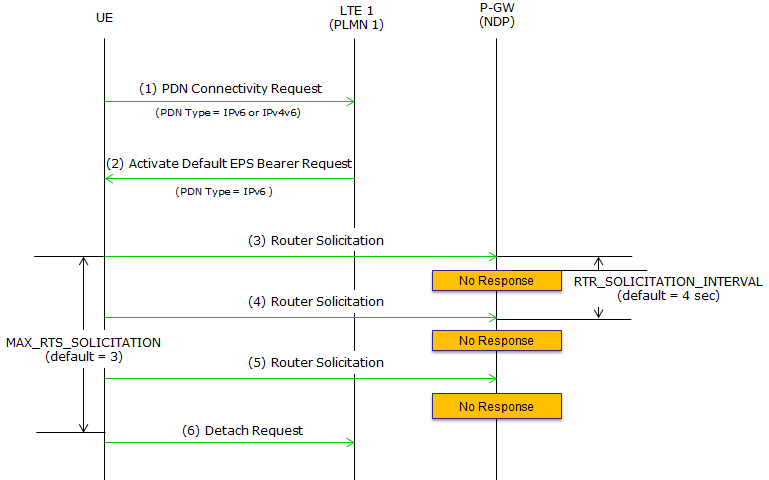
The two counts in the diagram are RFC 4861 host constants : MAX_RTR_SOLICITATIONS is 3 and RTR_SOLICITATION_INTERVAL is 4 seconds, which is what the picture labels beside steps 3 to 5.The picture spells the first of them MAX_RTS_SOLICITATION : RFC 4861 section 10 calls it MAX_RTR_SOLICITATIONS.Step 6 is a choice, not a requirement : the 3GPP specifications say nothing about what the UE does when the advertisement never comes, and a Detach Request is one implementation's answer.The bearer stays up throughout : the failure is in the user plane, so a test that watches only NAS sees an attach that worked.
TC-Case 5 : IPv4v6 and RA Failure
The same failure with a dual stack bearer underneath it. The UE has a working IPv4 address this time, so abandoning IPv6 costs it less. The diagram below ends differently from the one above, and neither ending is wrong.
- PDN Type = IPv4v6
- Access Point Name = Any (Omit is also allowed)
- Protocol Configuration Option
- DNS Server IPv4
- DNS Server IPv6
- AccessPointName = xyz
- Protocol Configuration Option
- DNS IPv4 Address
- DNS IPv6 Address
- PDN Type = IPv4v6
- PDN Address Information = [A specific Network Interface ID] e.g> 0000000000000001C0A80147
i) Setup Test Equipment with the Parameter Setting XYZ
ii) Power on UE and let UE initiate the attach process for the network.
iii) Verify UE send PDN Connectivity Request (piggybacked in RRC Connection Setup Complete) with the following IEs
iv) Verify Network send Activate Default EPS Bearer Context Reqest with following IEs
v) Complete Attach/Registration Process
vi) follow the steps (3)~(6) as shown below.
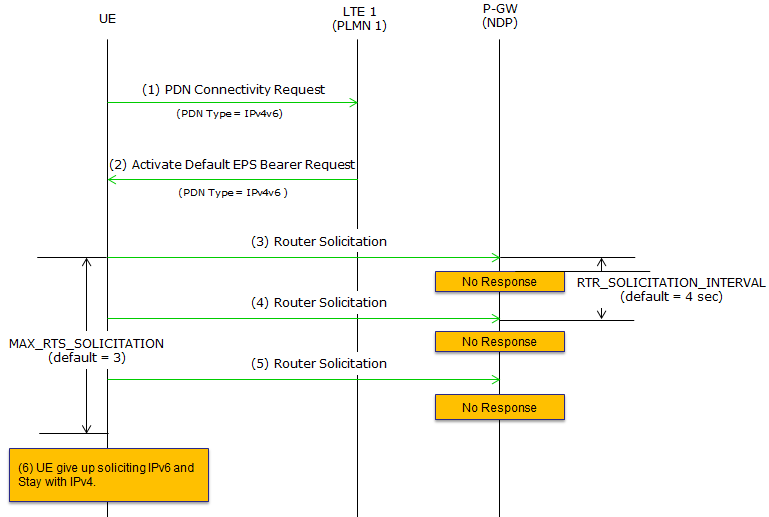
The same failure ends differently here : the note at the lower left has the UE give up soliciting IPv6 and stay with IPv4, where the diagram above has it send a Detach Request.Both endings are conformant : 24.301 and 23.401 both leave the choice open, which is the mismatch this page opens by describing.This is the case the requirement list covers : item iv of REQUIREMENT-UE Case 2 asks the UE not to detach, and it exists because implementations differ here.Write the expected result as a set, not a value : a test case that names one of the two endings will fail half the devices on the market for no defect.
Reference
[1] 24.301 : 3GPP - Non-Access-Stratum protocol for EPS; Stage 3, v20.0.0. Clause 9.9.4.9 gives the PDN address element and the octet order for each PDN type, and clauses 6.2.2 and 6.5.1.3 give the ESM cause sent when the network restricts the IP version.
[2] 24.008 : 3GPP - Mobile radio interface Layer 3 specification; Core network protocols; Stage 3, v20.0.0. Clause 10.5.6.4 gives the packet data protocol address, whose octet order is the reverse of the 24.301 one.
[3] 23.401 : 3GPP - GPRS enhancements for E-UTRAN access, v20.0.0. Clause 5.3.1.2.2 gives the prefix by Router Advertisement, and clause 5.3.2.1 makes the Router Solicitation optional and says what the UE reads as a dual address grant.
[4] RFC 4861 : IETF - Neighbor Discovery for IP version 6. Section 10 gives the host constants MAX_RTR_SOLICITATIONS and RTR_SOLICITATION_INTERVAL. Only that section was read for this page.