When you power on the mobile device, in most case the device is under a circumstance where it sees many base station (gNB) around it. In some cases UE would be surrounded not by the multiple basestation from one network operator but by the multiple basestation from different network operators.
Out of those many cells, UE can camp on (register) to only one cell. Then the question is which specific single cell the UE have to register. For this UE goes through a specific decision making process to pick up a specific Cell to register, this specific decision making process is called 'Cell Selection'.
Cell Selection process in NR is very similar to the Cell Selection Process in LTE. So the description in this page would be almost identical to the LTE Cell Selection page.
- Walking the nine cases through the flow chart
- Acceptable Cell / Suitable Cell
- The three cell selection procedures
- Camped states and what service you actually get
- The NAS reject causes, and the word "except"
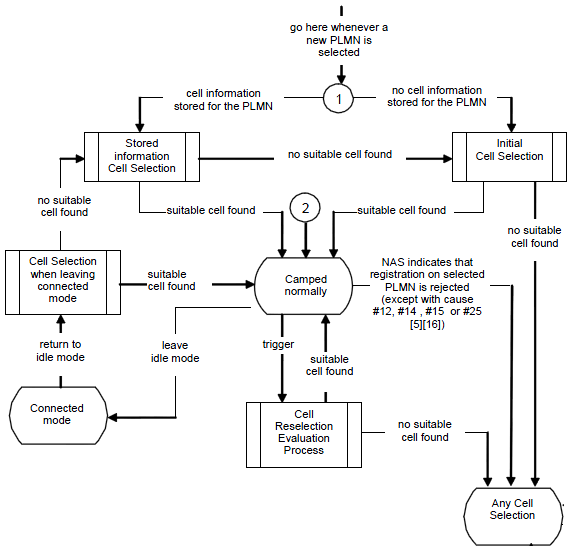
Overall description of cell selection process is described in 38.304 Figure 5.2.3: Cell Selection Process and 5.2.4 Cell Reselection Evaluation Process
That figure appears further down this page. Before you get there, here is the same thing stripped down to its spine, with the connected-mode and reselection branches left out :
                       +--------------------------------+
                       |    new PLMN selected by NAS    |
                       +--------------------------------+
                                        |
                 +----------------------+----------------------+
cell info stored |                                             | no cell info stored
                 |                                             |
                 v                                             v
   +---------------------------+                 +---------------------------+
   |    Stored Information     | no suitable cell|       Initial Cell        |
   |      Cell Selection       |---------------->|         Selection         |
   +---------------------------+                 +---------------------------+
                 |                                             |        |
                 | suitable cell found                         |        | no suitable cell found
                 +----------------------+----------------------+        |
                                        v                               |
                          +--------------------------+                  |
                          |     CAMPED NORMALLY      |                  |
                          |      normal service      |                  |
                          +--------------------------+                  |
                                        |                               |
                                        |  registration rejected,       |
                                        |  EXCEPT with cause            |
                                        |  #12, #14, #15 or #25         |
                                        |                               |
                                        v                               v
                  +--------------------------------------------------------+
                  |                   Any Cell Selection                   |<------------ no USIM
                  +--------------------------------------------------------+
                                              | acceptable cell found
                                              v
                                +--------------------------+
                                |    CAMPED ON ANY CELL    |
                                |     limited service      |
                                +--------------------------+
Everything else in the full figure is detail hung off those decisions. Naming them explicitly makes the real chart much less frightening :
Do I have stored information for this PLMN ? - decides whether the UE takes the fast path or the slow path.Did I find a SUITABLE cell ? - note that the two procedures donot fail the same way. If Stored Information Cell Selection finds nothing it fallssideways into Initial Cell Selection and tries again properly. Only when Initial Cell Selection also finds nothing does the UE drop to Any Cell Selection.Did I find an ACCEPTABLE cell ? - decides whether the fallback gives emergency-only service. This is also where a UE withno USIM enters the chart, as the second half of the figure shows.Was my registration rejected ? - and here the figure repays careful reading, because its condition is anexception rather than a trigger. See the reject causes section below.
Notice that the two words doing all the work here are
Pretty complicated flow diagram, right ? But you will find it even more complicated if you try to associate this flow to the situation you come across when you test the device in real life. You see in this flow diagram many branches and loops which makes it difficult to follow the right path and other thing is that it is not so easy to figure the exact status of the UE when you turn on the UE.
Let me give you some examples in which UE needs to go through the cell selection process.
- i) You got a new phone from the shop and just inserted the USIM and power on the device.
- ii) You have been using a phone for a while, and power it off and then power on.
- iii) You have been using a phone for a while and switch it to Airplan mode and then switch back to the normal mode.
- iv) You have been using a phone for a while and switch it to Airplan mode and flew into another country and then switch back to the normal mode.
- v) You just turned on a phone and turn it off right away in the middle of registration and then turned it on.
- vi) Turned off the phone you have been using and pull out the battery and then put the battery back and turn it on.
- vii) Turned off the phone you have been using and pull out the battery, pull out the USIM and put a new USIM in and then put the battery back and turn it on.
- viii) Turned of the phone you have been using and leave it off for several days and then turn it on.
- ix) Turned of the phone you have been using and take out the USIM, and then turn it on without USIM.
Can you mark the path on this flow diagram for each of the cases listed above ? To be honest, I may be able to do it only a couple of the case and not for all.
Walking the nine cases through the flow chart
Let me try to answer that question, because it turns out that once you ask the right question of each case, most of them fall out cleanly. And the right question is not "what did the user do?" - it is :
Every one of the nine cases is really a different answer to that one question. Here they are side by side.
| What the UE still has | Which branch it takes | Where it ends up | |
|---|---|---|---|
i) |
Nothing of its own. Only the band lists the manufacturer preconfigured |
Camped normally, but by the slowest route - a full scan of every supported band |
|
ii) |
Last camped frequency and PLMN, held in non-volatile memory |
Camped normally, quickly. The everyday case |
|
iii) |
Everything, and it never even lost power - the context is still in RAM |
Usually back on the very same cell. The |
|
iv) |
Stored information, but all of it describes another continent |
Camped normally on a roaming partner, after a visible delay. The path everyone has watched at an airport |
|
v) |
Possibly the frequency, but no registered PLMN and no valid 5G-GUTI - registration never finished |
Finds the cell fast, then has to register from scratch. See the note below - this one is genuinely implementation dependent |
|
vi) |
The same as ii). Pulling the battery clears RAM, not non-volatile memory |
Identical outcome to ii). See the note below on why this case and iii) are worth comparing |
|
vii) |
Stored information that belongs to the |
Depends on the new USIM's PLMN - see below |
Registration is fresh either way, because the SUPI changed |
viii) |
Stored information, still valid if you have not moved, but a long expired registration |
Cell found quickly ; registration is a new one because the UE was implicitly deregistered days ago |
|
ix) |
No USIM, so there is no PLMN to select and stored information is irrelevant |
Four of these deserve a bit more than a table row.
- If the new USIM belongs to a
different PLMN, there is no stored information for the newly selected PLMN, and the UE takesInitial Cell Selection . - If the new USIM belongs to the
same PLMN - a replacement SIM from the same operator, say - the stored information is still perfectly valid for that PLMN, and the UE takesStored Information Cell Selection .
Either way NAS registration starts fresh, because the subscriber identity has changed and any 5G-GUTI the UE was holding belongs to someone else.
If you have access to UE logging tools, try to collect field test log in various situation and analize the log according to this flow charts. Only practice would make you understand this clearly unless you are the protocol stack developer who implements this process in UE.
Following diagram is from 38.304 Figure 5.2.2-1. (This is exactly same as LTE Process in 36.304). This is the case when UE find a suitable cell.
Following is the case where UE fails to find a suitable cell and camp on to any cell that is available.
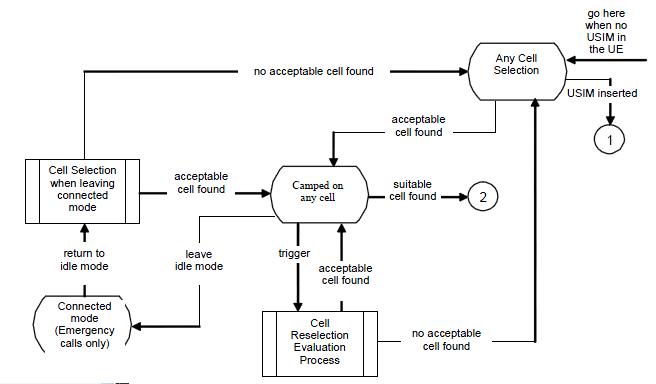
Followings are the keywords that you have to know in order to understand the follow chart shown above.
Acceptable Cell
Acceptable cell is the cell that is not enough to be a suitable cell, but meets the minimum condition at least to make an emergency call. The minimum conditions are
- The cell is not barred
- The cell selection criteria is met
Read that list again and notice how
Suitable Cell
The cell that the UE may camp on for a normal service. The E-UTRA and UTRA Suitable Cell criteria is defined in 36.304 4.3 Service types in Idle Mode as follows.
The cell is part of either:
- the selected PLMN (PLMN that has been selected by the NAS, either manually or automatically), or:
- the registered PLMN(PLMN on which certain Location Registration outcomes have occurred.
- a PLMN of the Equivalent PLMN list
according to the latest information provided by NAS:
- The cell is not barred;
- The cell is part of at least one TA that is not part of the list of "forbidden tracking areas for roaming"
- The cell selection criteria are fulfilled
Putting the two definitions side by side is the quickest way to see what is actually being asked :
| Condition | Acceptable | Suitable | Barred |
|---|---|---|---|
Cell is not barred |
|||
Cell selection criteria (S-criteria) met |
- |
||
Cell belongs to the selected / registered / equivalent PLMN |
not required |
- |
|
TA is not in the forbidden roaming list |
not required |
- |
|
emergency only |
everything |
none |
So every suitable cell is also an acceptable cell, but not the other way round. The two extra conditions that a suitable cell must satisfy are both about
The three cell selection procedures
The flow chart at the top has three named procedures in it, and their names are unfortunately similar enough to blur together. They are genuinely different things :
| Procedure | When it runs | What the UE actually does | Speed |
|---|---|---|---|
No stored information for the PLMN being selected |
Scans all RF channels in every band it supports and, on each carrier, looks for the strongest cell |
||
Stored carrier / cell information is available for this PLMN |
Goes straight to the frequencies it already knows, and only falls back to a scan if none of them work |
||
Neither of the above found a |
Looks for any |
fallback |
The distinction people most often get wrong is the first two. They are not "quick scan" and "full scan" of the same procedure - they are chosen by a single yes/no question at the top of the chart, and the UE only ever runs the slow one if the fast one has nothing to work with or has already failed.
Camped states and what service you actually get
The flow chart ends in a state, not in an event, and there are three of them. Being able to name which one a device is in is most of what you need when reading a field log :
| State | Reached from | What the UE can and cannot do |
|---|---|---|
A suitable cell was found |
Everything : registration, paging, calls, data. Monitors paging and system information, and runs cell reselection normally |
|
Any Cell Selection found an acceptable cell |
Emergency calls and emergency alerts (ETWS / CMAS) only. Still monitors paging and SI, and keeps looking for a suitable cell in the background |
|
Not even an acceptable cell yet |
No service at all. The UE is still searching. This is what "No Service" on the screen actually means |
The NAS reject causes, and the word "except"
These four cause values appear three times in the case walkthroughs below, so they are worth pinning down - and the flow chart says something slightly different from what you might expect. Look closely at the label on the arrow running from
     NAS indicates that registration on selected PLMN is rejected
                ( except with cause #12, #14, #15 or #25 )
                                    |
                                    v
                          Any Cell Selection
The word is
Once you read it that way the grouping makes sense. All four of these say "not here" rather than "not you" :
| Cause | Meaning | Why it is an exception |
|---|---|---|
#12 |
Tracking area not allowed |
The PLMN is still fine, only this tracking area is not. The UE adds the TAI to its forbidden list and looks for a cell in a different TA of the same network |
#14 |
EPS services not allowed in this PLMN |
Scoped to this one PLMN, so the sensible response is to go back to PLMN selection rather than give up on normal service altogether |
#15 |
No suitable cells in tracking area |
Again the tracking area is the problem, not the network. The UE searches other tracking areas of the same PLMN |
#25 |
Not authorized for this CSG |
A closed subscriber group cell the UE is not a member of. One specific cell is closed to it, nothing wider |
So if the rejection is
Even though the flow chart shown above handles various situations, if you don't follow through each of the case one by one, it would be difficult for you to get any concrete understanding for each specific case. My recommendation is to mark a specific path for each specific case one by one as examples shown below.
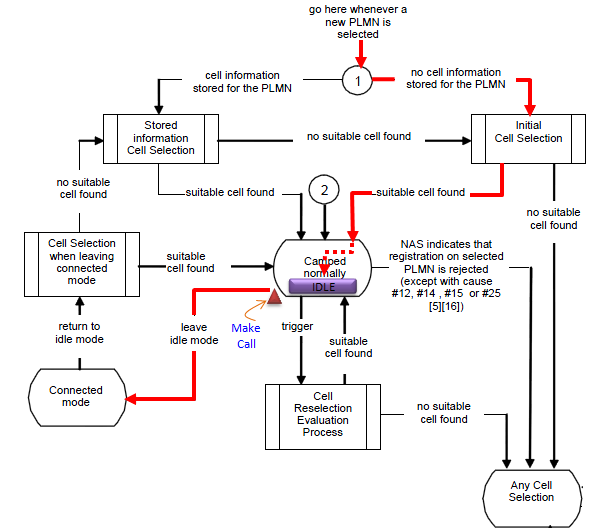
Case 1 : Initial Cell Selection
This flow describes the Initial Cell Selection process in mobile networks, focusing on how the UE selects a suitable cell for communication. This is what happens in your mobile phone when you power on for the first time.
Followings are some highlights on this scenario
When a new PLMN (Public Land Mobile Network) is selected, the UE first checks whether it has stored information about cells in this PLMN. If no cell information is stored for the selected PLMN, the UE proceeds to the Initial Cell Selection process.
- Initial Cell Selection: In this process, the UE scans all available frequency bands to find a suitable cell to camp on. If no suitable cell is found, the UE continues searching until a suitable cell is identified.
If no suitable cell is found during the Stored Information Cell Selection or Initial Cell Selection, the red arrow shows that the UE reverts to performing Any Cell Selection.
- Any Cell Selection: The UE tries to find any available cell, even if it is not part of the selected PLMN, as long as it allows for emergency or limited services.
If the UE finds a suitable cell and camps on it in the Idle state, it attempts to register with the network. If the network rejects the registration with specific causes (e.g., cause #12, #14, #15, or #25), the UE exits the idle state and re-enters the Cell Selection process .
While in the Idle state, if the UE is required to make a call or perform any uplink transmission (e.g., mobile-originated call or data session), it transitions from the Idle state to Connected Mode (red arrow). This action triggers a transition to actively communicate with the network.
Case 2 : Stored Cell Selection
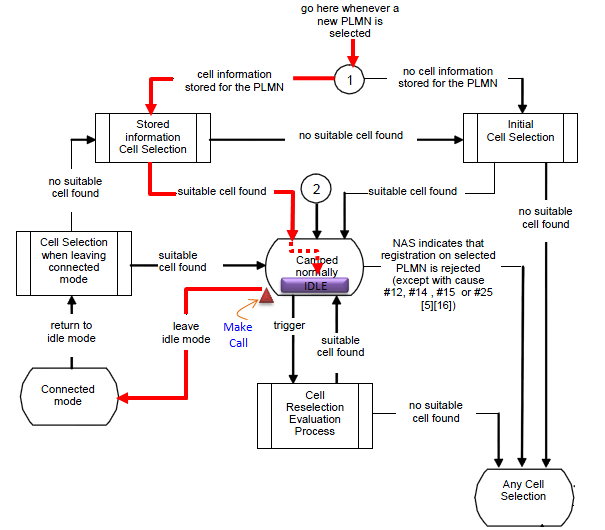
This scenario focuses on how the UE utilizes stored information to select a suitable cell for communication.
Followings are some highlights on this scenario
When the UE switches to a new PLMN (Public Land Mobile Network), it first checks for stored cell information associated with that PLMN. If cell information is stored, the UE enters the Stored Information Cell Selection process (red arrow). This step enables the UE to quickly identify a suitable cell without initiating a full scan. If no suitable cell is found using stored information, the UE proceeds to the Initial Cell Selection process.
If the Stored Information Cell Selection process fails to identify a suitable cell, the UE moves to Any Cell Selection (red arrow). In this fallback scenario, the UE attempts to camp on any available cell, even if it is not part of the selected PLMN. This ensures that the UE can access emergency or limited services if no preferred cell is available.
If the UE successfully finds a cell and enters the Idle state, it attempts to register with the network. If the network rejects the registration with specific NAS causes (e.g., #12, #14, #15, or #25), the UE exits the idle state and returns to the Cell Selection process (red arrow). This rejection indicates that the selected PLMN or cell does not meet the UE's requirements, prompting the UE to restart the selection process.
While in the Idle state, if the UE initiates a call or requires an uplink communication, it transitions to Connected Mode (red arrow). This involves switching to an active communication state where the UE can transmit and receive data with the network.
Case 3 : Cell Reselection
This scenario describes how the UE evaluates and switches to a more suitable cell while in the Idle state
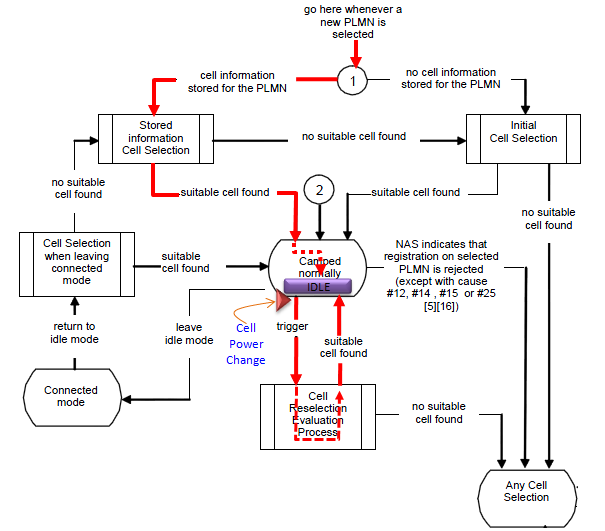
When the UE is in the Idle state and camped on a cell, it continuously monitors the network for better cell options. A trigger for the Cell Reselection Evaluation Process occurs in scenarios such as:
- Change in cell power: The UE detects a degradation in signal quality (e.g., reference signal power or quality drops below a threshold).
- Network-triggered re-evaluation: The network may instruct the UE to reselect based on specific policies or conditions.
Upon detecting a trigger, the UE enters the Cell Reselection Evaluation Process (red arrow). This involves:
- Scanning neighboring cells and evaluating their signal quality based on predefined criteria such as RSRP (Reference Signal Received Power) or RSRQ (Reference Signal Received Quality).
- Comparing the signal quality of the current cell with neighboring cells.
- Identifying a suitable cell that offers better service or higher priority, based on PLMN and frequency priorities provided by the network.
If a suitable cell is found during this process, the UE reselects the new cell and camps on it.
If the Cell Reselection Evaluation Process fails to find a suitable cell, the UE remains camped on the current cell and continues monitoring until conditions improve or another trigger occurs. If the current cell becomes entirely unsuitable (e.g., due to coverage loss), the UE transitions to Any Cell Selection (red arrow), where it attempts to connect to any available cell, even outside the current PLMN.
If the UE camps on a suitable cell but the network rejects the registration request with specific causes (e.g., #12, #14, #15, or #25), the UE is forced to reinitiate the selection process. This may involve returning to Cell Reselection or moving to Any Cell Selection, depending on the conditions (red arrow).
If the UE is required to initiate communication (e.g., a call or data transmission), it leaves the Idle state and transitions to Connected Mode (red arrow). This ensures the UE can actively communicate with the network.