What is Device Driver ?
If you need a very basic level of descriptions on device driver, you may refer to my note on Operating System : Device Driver page. If you already have general understanding on device driver, just looking into following illustration would give you enough information on device drivers in Linux's point of view.
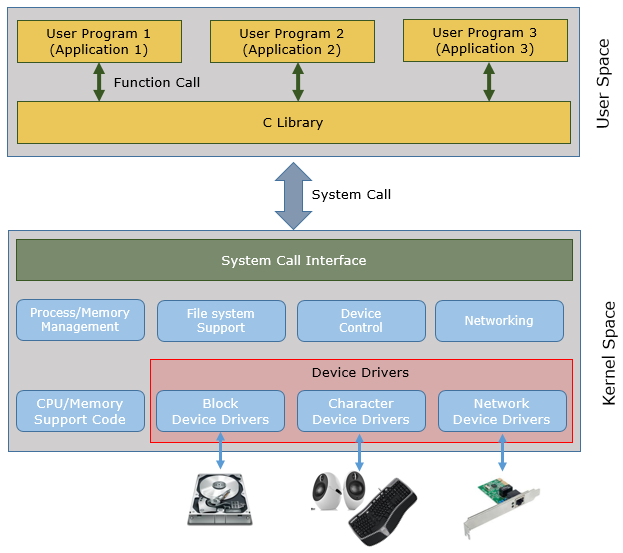
Character Device Driver vs Block Device Driver
Character Device Driver : The device (hardware) that handles data in character by character. The word 'character' does not mean a letter. It rather indicates 'Byte'. That is, Character Device Driver is the one communicating with hardware that are handling data in Byte by Byte unit. Typical examples of Character Device are serial port, parallel port, sound card etc.
Block Device : The device (hardware) that handles data in blocks. The 'block' here means a chunk of data stored in a buffer. Typical example of Block Device are Hard Disk, USB Camera etc.
You can figure out whether a device (device driver) is a character type driver or block type driver by looking at the first letter of ls -al output as shown below. 'c' indicates 'character type' and 'b' indicates 'block type'.
$ ls -al /dev
...
crw------- 1 root root 5, 1 Jan 27 03:05 console
crw------- 1 root root 10, 59 Jan 27 03:05 cpu_dma_latency
..
crw-r----- 1 root kmem 1, 4 Jan 27 03:05 port
crw------- 1 root root 108, 0 Jan 27 03:05 ppp
brw-rw---- 1 root disk 8, 0 Jan 27 03:05 sda
brw-rw---- 1 root disk 8, 1 Jan 27 03:05 sda1
brw-rw---- 1 root disk 8, 2 Jan 27 03:05 sda2
brw-rw---- 1 root disk 8, 5 Jan 27 03:05 sda5
crw-rw----+ 1 root cdrom 21, 0 Jan 27 03:05 sg0
crw-rw---- 1 root disk 21, 1 Jan 27 03:05 sg1
brw-rw----+ 1 root cdrom 11, 0 Jan 27 03:05 sr0
crw-rw-rw- 1 root tty 5, 0 Jan 27 21:06 tty
crw--w---- 1 root tty 4, 0 Jan 27 03:05 tty0
crw--w---- 1 root tty 4, 1 Jan 27 03:06 tty1
crw-rw---- 1 root dialout 4, 64 Jan 27 03:05 ttyS0
crw-rw---- 1 root dialout 4, 65 Jan 27 03:05 ttyS1
Linux assigns a specific number set < Major number, Minor Number > to each of device drivers. Major number indicates a specific device type and minor number indicates each individual devices belong to a specific device type.
You can figure out the Major and Minor number for each device from ls-al output as shown below. The number in Red represents the major number and the number in Green represents minor number.
$ ls -al /dev
...
crw------- 1 root root 5, 1 Jan 27 03:05 console
crw------- 1 root root 10, 59 Jan 27 03:05 cpu_dma_latency
..
crw-r----- 1 root kmem 1, 4 Jan 27 03:05 port
crw------- 1 root root 108, 0 Jan 27 03:05 ppp
brw-rw---- 1 root disk 8, 0 Jan 27 03:05 sda
brw-rw---- 1 root disk 8, 1 Jan 27 03:05 sda1
brw-rw---- 1 root disk 8, 2 Jan 27 03:05 sda2
brw-rw---- 1 root disk 8, 5 Jan 27 03:05 sda5
crw-rw----+ 1 root cdrom 21, 0 Jan 27 03:05 sg0
crw-rw---- 1 root disk 21, 1 Jan 27 03:05 sg1
brw-rw----+ 1 root cdrom 11, 0 Jan 27 03:05 sr0
crw-rw-rw- 1 root tty 5, 0 Jan 27 21:06 tty
crw--w---- 1 root tty 4, 0 Jan 27 03:05 tty0
crw--w---- 1 root tty 4, 1 Jan 27 03:06 tty1
crw-rw---- 1 root dialout 4, 64 Jan 27 03:05 ttyS0
crw-rw---- 1 root dialout 4, 65 Jan 27 03:05 ttyS1
You can see the relationship between Major and Minor number in the following example. Following example is representation of disk devices (marked in Blue) in a tree format. In this example, the major number 8 is a uniquely assigned to the disk driver by linux kernal, the minor number 1,2,5 is assigned to each individual disk in my Linux PC.
sda < Major 8, Minor 0 >
|-- sda1 < Major 8, Minor 1 >
|-- sda2 < Major 8, Minor 2 >
|-- sda5 < Major 8, Minor 5 >
User Level Program vs Device Driver (Module) Program
|
User Level Program |
Device Driver Program |
|
int main () <== Entry Point. Executes from here {
//Run procedure sequentially
return ; <== Exit Point.
} |
xxxx_init() <== specified in module_init(xxxx_init); <== executed by insmod command
// Other functions are run by a specific event. // e.g, function call from user level program
xxxx_exit() <== specified in module_exit(xxxx_exit); <== executed by rmmod command |
Reference :
[1] Using the /dev and /proc file systems