Beacon is a special type of signal (message) being broadast periodically from an AP (Access Point) which carries its ID and capability to every devices placed around the AP.
Putting in other way, a Beacon is a type of frame in Wi-Fi networks (IEEE 802.11) that is broadcast by wireless access points (APs) to signal their presence. These frames are transmitted at regular intervals to allow wireless devices to find and identify the network, synchronize with it, and understand its capabilities. Beacons are essential for enabling devices to detect the presence of a network, assess its compatibility, and maintain synchronization for communication.
Let's follow the beacon through four questions on this page. The first is what a phone does with the beacons it hears. The second is how the frame is laid out, field by field. The third is what two real beacons carry, one from a 2.4 GHz 802.11g AP and one from a 5 GHz 802.11ac AP. The last is how often an AP sends a beacon, and how much airtime that costs.
- When and How my WiFi detect and use Beacon ?
- Structure of Beacon Frame
- Examples of Beacon
- How often is a Beacon sent and how much airtime does it take ?
- Reference
When and How my WiFi detect and use Beacon ?
I think this can be best explained with an example use case. Let's assume the case where we turn on WiFi on our mobile phone/
Turning on Wi-Fi: - When you enable Wi-Fi on your device, it starts scanning for available networks.
- The device listens for beacon frames, which are sent out at regular intervals by all nearby access points (APs).
- These beacon frames contain essential information such as the SSID (network name), supported data rates, and security protocols.
Network Discovery: - Your device uses the information from beacon frames to build a list of available Wi-Fi networks.
- This list is presented to you, typically with SSID names, and may include signal strength indicators derived from the beacon's signal properties.
Connection and Configuration: - When you select a network to connect to, your device uses the information from the beacon to configure its radio settings to match those of the AP (like the channel and frequency).
- If the network is open or you have the correct credentials (like a password), your device will go through the authentication and association process, which may include additional exchanges beyond beacons, such as authentication and association frames.
Maintaining Connection: - Even after you're connected, your device continues to listen for beacons to maintain synchronization with the AP.
- This helps your device stay updated on the status of the network, check for any changes, and manage its power-saving features effectively.
Roaming Between APs: - If you move around with your device, it may start receiving beacons from other APs with a stronger signal.
- Your device can decide to roam to a new AP based on this information, ensuring you maintain the best possible connection.
Power Saving: - When your device is not actively using the network, it can enter a power-saving mode where it sleeps between beacon intervals.
- The device will wake up as beacons are received to check for pending data indicated by the Traffic Indication Map (TIM) within the beacon frame.
The steps above describe passive scanning, where the device only listens. A device can also scan actively. In that case it sends a Probe Request on each channel, and the AP answers with a Probe Response. The Probe Response carries almost the same fields as the beacon, so the device learns the same things sooner. But it has to transmit to get them. Passive scanning needs no transmission, but the device must stay on each channel for at least one beacon interval. With the common interval of 100 TU, that is 102.4 ms per channel.
The beacon is the first thing a device reads from a network : discovery, configuration, synchronization, roaming and power saving all start from the fields it carries.A device keeps reading beacons after it connects : the TIM and the timing fields matter most once the device sleeps between beacons.Passive scanning is slow but silent : the device waits about one beacon interval per channel. Active scanning sends a Probe Request and gets the answer sooner.
Structure of Beacon Frame
The overall frame structure of Beacon is as follows. A beacon is a management frame, so it uses the common 24-byte MAC header, then a frame body, then a 4-byte FCS. The upper row of the diagram below shows that header. The lower row expands the frame body and lists its fields in the order they are sent.
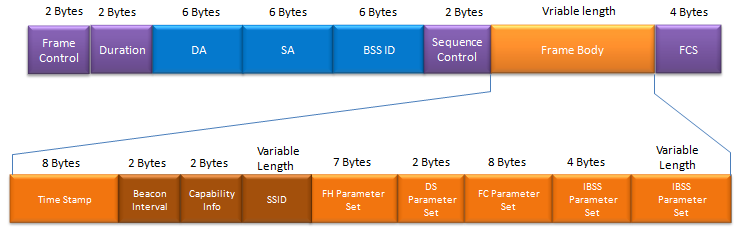
The beacon puts three fixed fields first and a run of variable length elements after them. Only the fixed fields have a fixed position in the frame.
MAC header : Frame Control, Duration, DA, SA, BSS ID and Sequence Control take 2 + 2 + 6 + 6 + 6 + 2 = 24 bytes. In a beacon, DA is the broadcast address ff:ff:ff:ff:ff:ff. SA and BSS ID both carry the AP's own MAC address, and the captures below show exactly that.Fixed fields : Time Stamp, Beacon Interval and Capability Info take 8 + 2 + 2 = 12 bytes. Wireshark reports the same total as "Fixed parameters (12 bytes)" in both examples below.Elements : SSID and every box after it are elements. Each element starts with a 1-byte element ID and a 1-byte length, and the value follows. The byte counts on the drawing include those 2 header bytes, so the 7-byte FH Parameter Set is 2 + 5.Two labels on the drawing need care : the box marked "FC Parameter Set" is the CF Parameter Set, as the table further down names it. The last box repeats the "IBSS Parameter Set" label. In that table, the field after IBSS is the TIM, which has a variable length. The drawing also leaves out Supported Rates, which the table places right after SSID.The DS Parameter Set is 3 bytes on air : the drawing gives 2 bytes. But the DS Parameter set in Example 1 shows Tag length: 1, so the element is 2 + 1 = 3 bytes. The box leaves out the element header.
The element format explains why a receiver can skip what it does not understand. It reads the ID and the length, and then it jumps over the value. So an old device can still read a beacon full of HT and VHT elements. The same format lets you check the byte counts in a capture. In Example 2 below, the eight elements take 19 + 10 + 6 + 28 + 24 + 14 + 7 + 26 = 134 bytes. That is exactly the "Tagged parameters (134 bytes)" total that Wireshark prints. The whole frame is then 24 + 12 + 134 + 4 = 174 bytes.
Only the first 12 bytes of the body have a fixed position : everything after Capability Info is an element, found by its ID rather than by its offset.Every element carries its own length : a receiver skips the elements it does not know. This lets new amendments add fields without breaking older devices.Where the drawing and a capture disagree, trust the capture : this applies to the CF, TIM and DS boxes. The capture shows what the AP really sent.
Examples of Beacon
A drawing shows where each field sits, but a capture shows what a real AP puts in it. This section reads beacons in that order. It starts with one MAC header and the list of elements a beacon can carry. Then it reads two full beacons from two generations of Wi-Fi.
Following is an example showing the Beacon Frame Header part
Decoded 802.11 frame,
IEEE 802.11 Beacon frame, Flags: ..m.....C
    Type/Subtype: Beacon frame (0x08)
    Frame Control Field: 0x8020
        .... ..00 = Version: 0
        .... 00.. = Type: Management frame (0)
        1000 .... = Subtype: 8
        Flags: 0x20
            .... ..00 = DS status: Not leaving DS or network is operating in AD-HOC mode
                        (To DS: 0 From DS: 0) (0x00)
                        // (To DS: 0 From DS: 0) mean the address 1 is Destination address
                         // the address 2 is Source address
            .... .0.. = More Fragments: This is the last fragment
            .... 0... = Retry: Frame is not being retransmitted
            ...0 .... = PWR MGT: STA will stay up
            ..1. .... = More Data: Data is buffered for STA at AP
            .0.. .... = Protected flag: Data is not protected
            0... .... = Order flag: Not strictly ordered
    .000 0000 0000 0000 = Duration: 0 microseconds
    Receiver address: Broadcast (ff:ff:ff:ff:ff:ff)
    Destination address: Broadcast (ff:ff:ff:ff:ff:ff)
    Transmitter address: Anritsu_07:91:0e (00:00:91:07:91:0e)
    Source address: Anritsu_07:91:0e (00:00:91:07:91:0e)
    BSS Id: Anritsu_07:91:0e (00:00:91:07:91:0e)
    Fragment number: 0
    Sequence number: 78
    Frame check sequence: 0xe0fbec2b [correct]
        [Good: True]
        [Bad: False]
Three things in this header need a closer look. The first is the address set. Receiver and Destination are both broadcast, while Transmitter, Source and BSS Id all carry the AP's own address, 00:00:91:07:91:0e. The second is the flag string "..m.....C". Wireshark writes one letter for each Frame Control flag that is set, so "m" is the More Data bit. The final "C" means that Wireshark checked the FCS and found it correct. The third is the Frame Control value 0x8020. Its first byte, 0x80, holds Subtype 8 and Type 0, and its second byte, 0x20, holds the flags. The Example 1 screenshots further down print the same field as 0x0080, because that older Wireshark shows the two bytes in the other order.
Following is the list of information broadcast carried in [Frame Body] of a Beacon signal. Not all of these information are broadcast by an AP. Many of these fields are broadcast only in a specific condition (you can find the further details in 802.11 - 8.3.3.2 Beacon frame format).
|
Order |
Information |
Description |
|
1 |
Time Stamp |
Indicates the time when the beacon frame was sent to help synchronize devices on the network. |
|
2 |
Beacon Interval |
The time interval between the transmission of beacon frames by the access point. |
|
3 |
Capability Information |
Information about the network's capabilities, such as security and supported data rates. |
|
4 |
SSID |
The network name that identifies a specific wireless network. |
|
5 |
Supported Rates |
The set of data rates that the network supports for transmission. |
|
6 |
FH Parameter Set |
Parameters for networks using Frequency Hopping Spread Spectrum (FHSS) technology. |
|
7 |
DS Parameter Set |
Parameters for networks using Direct Sequence Spread Spectrum (DSSS) technology, including the channel number. |
|
8 |
CF Parameter Set |
Defines the parameters for Contention-Free (CF) periods in wireless networks, used primarily in PCF mode. |
|
9 |
IBSS Parameter Set |
Configuration parameters specific to Independent Basic Service Sets (IBSS), or ad-hoc networks. |
|
10 |
TIM |
Traffic Indication Map, which indicates data buffered at the access point for power-saving clients. |
|
11 |
Country |
Specifies operational restrictions related to the wireless spectrum, including channels and transmit powers, based on country regulations. |
|
12 |
FH Parameters |
Additional parameters for networks utilizing Frequency Hopping Spread Spectrum technology, detailing hop patterns and dwell times. |
|
13 |
FH Pattern Table |
A table that defines the specific frequency hopping patterns to be used in FHSS networks. |
|
14 |
Power Constraint |
Indicates any restrictions on the transmit power for the access point, often due to regulatory requirements. |
|
15 |
Channel Switch Announcement |
Notifies network devices of an impending switch to a new channel, usually for interference management or load balancing. |
|
16 |
Quiet |
Specifies periods during which the network will not initiate transmission, typically for radar detection and avoidance. |
|
17 |
IBSS DFS |
Defines the Distributed Frequency Selection parameters for ad-hoc networks to comply with radar detection and avoidance requirements. |
|
18 |
TPC Report |
Transmit Power Control report, providing information on the current transmit power and capabilities for power adjustment. |
|
19 |
ERP |
Extended Rate PHY parameters for networks that support 802.11g operation, to ensure compatibility with 802.11b devices. |
|
20 |
Extended Supported Rates |
Additional supported data rates beyond the initial set included in the Supported Rates element. |
|
21 |
RSN |
Robust Security Network information, detailing the security protocols and encryption methods supported by the network. |
|
22 |
BSS Load |
Information about the current load on the network, including the number of connected devices and traffic levels. |
|
23 |
EDCA Parameter Set |
Defines the Enhanced Distributed Channel Access parameters for QoS, detailing the access categories and their characteristics. |
|
24 |
QoS Capability |
Indicates the Quality of Service capabilities of the network, including supported QoS protocols and configurations. |
|
25 |
AP Channel Report |
Lists the channels supported by the access point, providing information for channel selection and management. |
|
26 |
BSS Average Access Delay |
Provides information on the average delay for accessing the medium in the BSS, relevant for QoS assessments. |
|
27 |
Antenna |
Information about the antenna used by the access point, potentially including type, capabilities, and orientation. |
|
28 |
BSS Available Admission Capacity |
Details the available capacity in the BSS for admitting new stations under QoS constraints. |
|
29 |
BSS AC Access Delay |
Reports the access delay for different Access Categories (AC) in the BSS, important for QoS planning and management. |
|
30 |
Measurement Pilot Transmission |
Specifies the characteristics of pilot transmissions used for measurement purposes in the network. |
|
31 |
Multiple BSSID |
Indicates support for multiple BSSIDs by the access point, allowing for multiple virtual networks on a single physical device. |
|
32 |
RM Enabled Capabilities |
Radio Measurement capabilities, detailing what measurements the network can perform and report. |
|
33 |
Mobility Domain |
Specifies the domain over which Fast BSS Transition (FT) can occur, facilitating rapid movement between access points. |
|
34 |
DSE Registered Location |
Contains information about the registered location for DSE-enabled devices, important for regulatory compliance. |
|
35 |
Extended Channel Switch Announcement |
Enhanced information for channel switch announcements, including additional parameters for more complex switching scenarios. |
|
36 |
Supported Operating Classes |
Lists the operating classes supported by the device, indicating the sets of channels and maximum transmit powers for different regions. |
|
37 |
HT Capabilities |
Provides details on the High Throughput (HT) capabilities of the network, including supported MCS sets and channel widths. |
|
38 |
HT Operation |
Information about the operational settings for HT networks, such as channel width and primary/secondary channel information. |
|
39 |
20/40 BSS Coexistence |
Describes mechanisms in place to allow for coexistence between 20 MHz and 40 MHz wide channels in the same vicinity. |
|
40 |
Overlapping BSS Scan Parameters |
Parameters for scanning and identifying overlapping BSSs, important for avoiding interference and optimizing channel use. |
|
41 |
Extended Capabilities |
Additional capabilities of the network or device not covered by standard capability information fields. |
|
42 |
FMS Descriptor |
Flexible Management of Service descriptors, detailing how services can be managed flexibly across the network. |
|
43 |
QoS Traffic Capability |
Information on the Quality of Service and traffic management capabilities of the network. |
|
44 |
Time Advertisement |
Provides timing synchronization information to devices, enabling accurate timekeeping across the network. |
|
45 |
Interworking |
Details the support for interworking with external networks, such as cellular networks, including access network type and availability. |
|
46 |
Advertisement Protocol |
Specifies the protocols used for advertising network services and connectivity options to devices. |
|
47 |
Roaming Consortium |
Identifies the roaming consortiums the network is part of, facilitating seamless roaming for devices across different networks. |
|
48 |
Emergency Alert Identifier |
Provides information for emergency alert systems, enabling the transmission of emergency alerts through the network. |
|
49 |
Mesh ID |
Identifies a mesh network, allowing devices to recognize and participate in the mesh topology. |
|
50 |
Mesh Configuration |
Configuration parameters for mesh networks, detailing operational settings for mesh functionality. |
|
51 |
Mesh Awake Window |
Specifies the awake window for mesh devices, indicating when devices should be active to participate in mesh communication. |
|
52 |
Beacon Timing |
Information about the timing of beacon transmissions in mesh networks, critical for synchronizing devices. |
|
53 |
MCCAOP Advertisement Overview |
Provides an overview of MCCAOP (Multichannel Coordinated Channel Access Operation) advertisements, relevant for coordinating channel access in mesh networks. |
|
54 |
MCCAOP Advertisement |
Detailed information about specific MCCAOP advertisements, used for managed access to channels in mesh networks. |
|
55 |
Mesh Channel Switch Parameters |
Parameters related to channel switching in mesh networks, enabling dynamic channel selection for efficiency and interference avoidance. |
|
Last |
Vendor Specific |
Contains information specific to the manufacturer or vendor, potentially including custom features or extensions. |
Followings are examples of Beacon Frame contents.
Following is an example from an old 802.11 specification, you would see relatively small set of informations included in the beacon. Compare this example with the next example which came from the latest specficiation (802.11ac) and how the feature set grows.
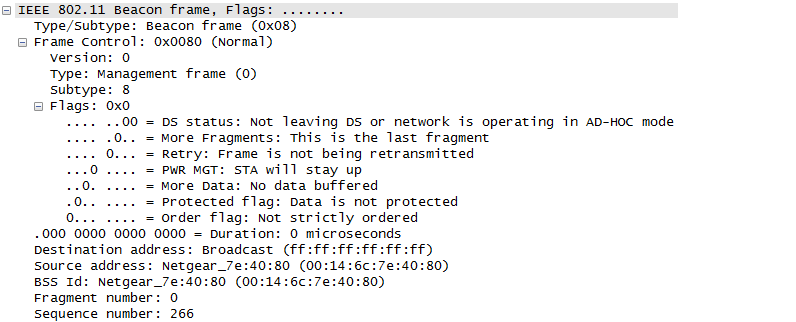
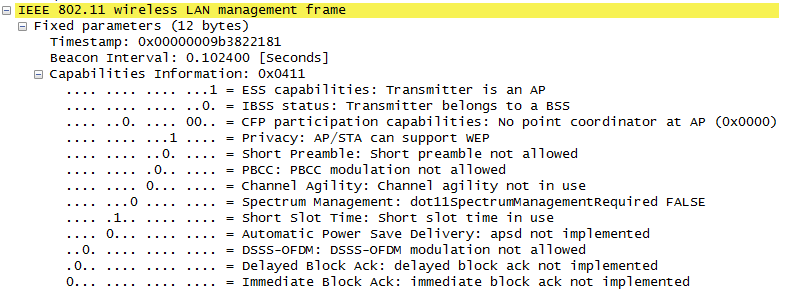
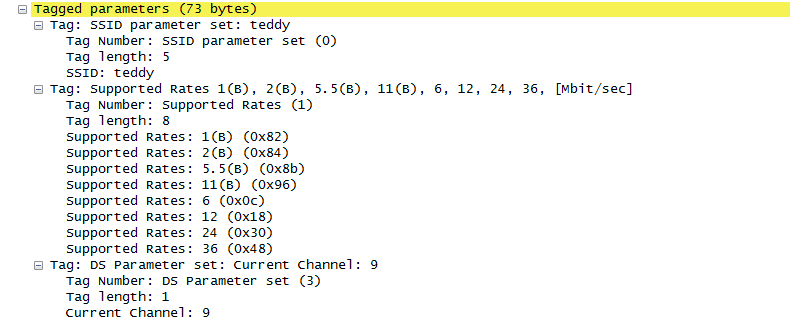
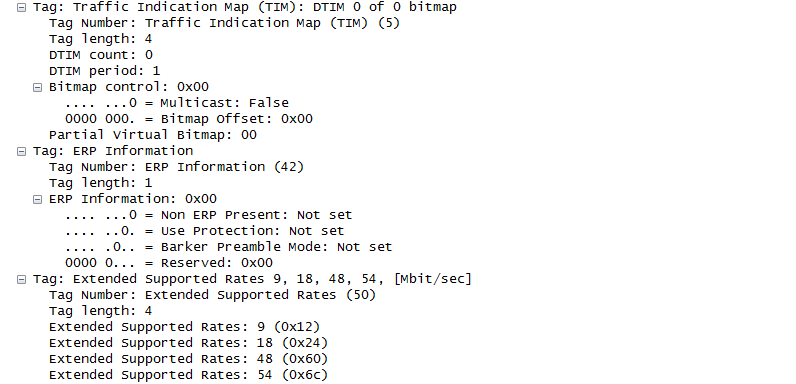

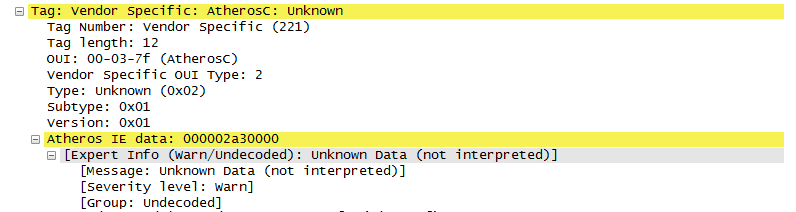
Example 1 is a 2.4 GHz 802.11g beacon protected with WPA. Its whole element list fits in 73 bytes.
Header : the frame goes to the broadcast address. Source and BSS Id both carry the Netgear AP's address, 00:14:6c:7e:40:80.Timing : the Beacon Interval of 0.102400 seconds is 100 TU, because Wireshark multiplies the field by 1024 microseconds. The Timestamp 0x00000009b3822181 is 41 666 355 585 microseconds, so the AP's TSF timer had counted about 11.6 hours.Capabilities 0x0411 : three bits are set. ESS says the sender is an AP, Privacy says the network is protected, and Short Slot Time says the BSS uses the short slot.Rates : each rate byte counts in steps of 500 kbit/s, and the top bit marks a basic rate. So 0x82 is 1 Mbit/s basic and 0x0c is 6 Mbit/s. The basic set is the four DSSS/CCK rates 1, 2, 5.5 and 11. Supported Rates carries eight rates here, and the remaining four go into Extended Supported Rates.Channel : the DS Parameter set puts the AP on channel 9. In the 2.4 GHz band the centre frequency is 2407 + 5 x 9 = 2452 MHz.802.11g markers : the ERP Information element is present with all flags clear. So no non-ERP station is reported, and protection is not in use.Security and vendor elements : the WPA Information Element names TKIP for both the multicast and the unicast cipher, and PSK for key management. That is WPA-Personal. The last element is an Atheros vendor element that Wireshark cannot decode.Size check : the eight elements take 7 + 10 + 3 + 6 + 3 + 6 + 24 + 14 = 73 bytes. This matches the "Tagged parameters (73 bytes)" line.
This is an example from the experimental AP(Access Point) called Anritsu MT8862 that support 802.11ac. The log is captured in a test setup shown here. Unless you get the full understanding of 802.11 PHY/MAC specification, it would be difficult to understand the meaning of all the parameters shown here. But if you go through all of the items here a couple of times even though you don't understand what it means. It will be helpful for you to read other technical material or specification related to 802.11. (The first step to learn any new things is to get used to it even though you don't understand the full details)
Decoded 802.11 frame,
IEEE 802.11 Beacon frame, Flags: ..m.....C
Type/Subtype: Beacon frame (0x08)
Frame Control Field: 0x8020
.... ..00 = Version: 0
.... 00.. = Type: Management frame (0)
1000 .... = Subtype: 8
Flags: 0x20
.... ..00 = DS status: Not leaving DS or network is operating in AD-HOC mode
(To DS: 0 From DS: 0) (0x00)
.... .0.. = More Fragments: This is the last fragment
.... 0... = Retry: Frame is not being retransmitted
...0 .... = PWR MGT: STA will stay up
..1. .... = More Data: Data is buffered for STA at AP
.0.. .... = Protected flag: Data is not protected
0... .... = Order flag: Not strictly ordered
.000 0000 0000 0000 = Duration: 0 microseconds
Receiver address: Broadcast (ff:ff:ff:ff:ff:ff)
Destination address: Broadcast (ff:ff:ff:ff:ff:ff)
Transmitter address: Anritsu_07:91:0e (00:00:91:07:91:0e)
Source address: Anritsu_07:91:0e (00:00:91:07:91:0e)
BSS Id: Anritsu_07:91:0e (00:00:91:07:91:0e)
Fragment number: 0
Sequence number: 78
Frame check sequence: 0xe0fbec2b [correct]
[Good: True]
[Bad: False]
IEEE 802.11 wireless LAN management frame
Fixed parameters (12 bytes)
Timestamp: 0x0000000000f3c041
Beacon Interval: 0.204800 [Seconds]
Capabilities Information: 0x0001
.... .... .... ...1 = ESS capabilities: Transmitter is an AP
.... .... .... ..0. = IBSS status: Transmitter belongs to a BSS
.... ..0. .... 00.. = CFP participation capabilities:
No point coordinator at AP (0x0000)
.... .... ...0 .... = Privacy: AP/STA cannot support WEP
.... .... ..0. .... = Short Preamble: Not Allowed
.... .... .0.. .... = PBCC: Not Allowed
.... .... 0... .... = Channel Agility: Not in use
.... ...0 .... .... = Spectrum Management: Not Implemented
.... .0.. .... .... = Short Slot Time: Not in use
.... 0... .... .... = Automatic Power Save Delivery: Not Implemented
...0 .... .... .... = Radio Measurement: Not Implemented
..0. .... .... .... = DSSS-OFDM: Not Allowed
.0.. .... .... .... = Delayed Block Ack: Not Implemented
0... .... .... .... = Immediate Block Ack: Not Implemented
Tagged parameters (134 bytes)
Tag: SSID parameter set: MT8862A6000000008
Tag Number: SSID parameter set (0)
Tag length: 17
SSID: MT8862A6000000008
Tag: Supported Rates 6(B), 9, 12(B), 18, 24(B), 36, 48, 54, [Mbit/sec]
Tag Number: Supported Rates (1)
Tag length: 8
Supported Rates: 6(B) (0x8c)
Supported Rates: 9 (0x12)
Supported Rates: 12(B) (0x98)
Supported Rates: 18 (0x24)
Supported Rates: 24(B) (0xb0)
Supported Rates: 36 (0x48)
Supported Rates: 48 (0x60)
Supported Rates: 54 (0x6c)
Tag: Traffic Indication Map (TIM): DTIM 0 of 0 bitmap
Tag Number: Traffic Indication Map (TIM) (5)
Tag length: 4
DTIM count: 0
DTIM period: 1
Bitmap control: 0x00
.... ...0 = Multicast: False
0000 000. = Bitmap Offset: 0x00
Partial Virtual Bitmap: 00
Tag: HT Capabilities (802.11n D1.10)
Tag Number: HT Capabilities (802.11n D1.10) (45)
Tag length: 26
HT Capabilities Info: 0x007e
.... .... .... ...0 = HT LDPC coding capability:
Transmitter does not support receiving LDPC coded packets
.... .... .... ..1. = HT Support channel width:
Transmitter supports 20MHz and 40MHz operation
.... .... .... 11.. = HT SM Power Save: SM Power Save disabled (0x0003)
.... .... ...1 .... = HT Green Field: Transmitter is able to receive PPDUs
with Green Field (GF) preamble
.... .... ..1. .... = HT Short GI for 20MHz: Supported
.... .... .1.. .... = HT Short GI for 40MHz: Supported
.... .... 0... .... = HT Tx STBC: Not supported
.... ..00 .... .... = HT Rx STBC: No Rx STBC support (0x0000)
.... .0.. .... .... = HT Delayed Block ACK:
Transmitter does not support HT-Delayed BlockAck
.... 0... .... .... = HT Max A-MSDU length: 3839 bytes
...0 .... .... .... = HT DSSS/CCK mode in 40MHz:
Won't/Can't use of DSSS/CCK in 40 MHz
..0. .... .... .... = HT PSMP Support: Won't/Can't support PSMP operation
.0.. .... .... .... = HT Forty MHz Intolerant: Use of 40 MHz transmissions
unrestricted/allowed
0... .... .... .... = HT L-SIG TXOP Protection support: Not supported
A-MPDU Parameters: 0x1f
.... ..11 = Maximum Rx A-MPDU Length: 0x03 (65535[Bytes])
...1 11.. = MPDU Density: 16 [usec] (0x07)
000. .... = Reserved: 0x00
Rx Supported Modulation and Coding Scheme Set: MCS Set
Rx Modulation and Coding Scheme (One bit per modulation): 1 spatial stream
.... .... .... .... .... .... 1111 1111 = Rx Bitmask Bits 0-7: 0x000000ff
.... .... .... .... 0000 0000 .... .... = Rx Bitmask Bits 8-15: 0x00000000
.... .... 0000 0000 .... .... .... .... = Rx Bitmask Bits 16-23: 0x00000000
0000 0000 .... .... .... .... .... .... = Rx Bitmask Bits 24-31: 0x00000000
.... .... .... .... .... .... .... ...0 = Rx Bitmask Bit 32: 0x00000000
.... .... .... .... .... .... .000 000. = Rx Bitmask Bits 33-38: 0x00000000
.... .... ...0 0000 0000 0000 0... .... = Rx Bitmask Bits 39-52: 0x00000000
...0 0000 0000 0000 0000 0000 000. .... = Rx Bitmask Bits 53-76: 0x00000000
.... ..00 0000 0000 = Highest Supported Data Rate: 0x0000
.... .... .... ...0 = Tx Supported MCS Set: Not Defined
.... .... .... ..0. = Tx and Rx MCS Set: Equal
.... .... .... 00.. = Maximum Number of Tx Spatial Streams Supported: 0x0000,
TX MCS Set Not Defined
.... .... ...0 .... = Unequal Modulation: Not supported
HT Extended Capabilities: 0x0006
.... .... .... ...0 = Transmitter supports PCO: Not supported
.... .... .... .11. = Time needed to transition between 20MHz and 40MHz:
5 msec (0x0003)
.... ..00 .... .... = MCS Feedback capability:
STA does not provide MCS feedback (0x0000)
.... .0.. .... .... = High Throughput: Not supported
.... 0... .... .... = Reverse Direction Responder: Not supported
Transmit Beam Forming (TxBF) Capabilities: 0x0000
.... .... .... .... .... .... .... ...0 = Transmit Beamforming: Not supported
.... .... .... .... .... .... .... ..0. = Receive Staggered Sounding:
Not supported
.... .... .... .... .... .... .... .0.. = Transmit Staggered Sounding:
Not supported
.... .... .... .... .... .... .... 0... = Receive Null Data packet (NDP):
Not supported
.... .... .... .... .... .... ...0 .... = Transmit Null Data packet (NDP):
Not supported
.... .... .... .... .... .... ..0. .... = Implicit TxBF capable: Not supported
.... .... .... .... .... .... 00.. .... = Calibration: incapable (0x00000000)
.... .... .... .... .... ...0 .... .... = STA can apply TxBF using CSI explicit
feedback: Not supported
.... .... .... .... .... ..0. .... .... = STA can apply TxBF using uncompressed
beamforming feedback matrix: Not supported
.... .... .... .... .... .0.. .... .... = STA can apply TxBF using compressed
beamforming feedback matrix: Not supported
.... .... .... .... ...0 0... .... .... = Receiver can return explicit CSI
feedback: not supported (0x00000000)
.... .... .... .... .00. .... .... .... = Receiver can return explicit
uncompressed Beamforming Feedback Matrix:
not supported (0x00000000)
.... .... .... ...0 0... .... .... .... = STA can compress and use compressed
Beamforming Feedback Matrix:
not supported (0x00000000)
.... .... .... .00. .... .... .... .... = Minimal grouping used for explicit
feedback reports: No grouping supported
(0x00000000)
.... .... ...0 0... .... .... .... .... = Max antennae STA can support when CSI
feedback required: 1 TX antenna sounding
(0x00000000)
.... .... .00. .... .... .... .... .... = Max antennae STA can support when
uncompressed Beamforming feedback
required: 1 TX antenna sounding
(0x00000000)
.... ...0 0... .... .... .... .... .... = Max antennae STA can support when
compressed Beamforming feedback required:
1 TX antenna sounding (0x00000000)
.... .00. .... .... .... .... .... .... = Maximum number of rows of CSI explicit
feedback: 1 row of CSI (0x00000000)
...0 0... .... .... .... .... .... .... = Maximum number of space time streams
for which channel dimensions can be
simultaneously estimated: 1 space time
stream (0x00000000)
000. .... .... .... .... .... .... .... = Reserved: 0x00000000
Antenna Selection (ASEL) Capabilities: 0x00
.... ...0 = Antenna Selection Capable: Not supported
.... ..0. = Explicit CSI Feedback Based Tx ASEL: Not supported
.... .0.. = Antenna Indices Feedback Based Tx ASEL: Not supported
.... 0... = Explicit CSI Feedback: Not supported
...0 .... = Antenna Indices Feedback: Not supported
..0. .... = Rx ASEL: Not supported
.0.. .... = Tx Sounding PPDUs: Not supported
0... .... = Reserved: 0x00
Tag: HT Information (802.11n D1.10)
Tag Number: HT Information (802.11n D1.10) (61)
Tag length: 22
Primary Channel: 36
HT Information Subset (1 of 3): 0x05
.... ..01 = Secondary channel offset: Secondary channel is above the primary
channel (0x01)
.... .1.. = Supported channel width: Channel of any width supported
.... 0... = Reduced Interframe Spacing (RIFS): Prohibited
...0 .... = Power Save Multi-Poll (PSMP) stations only: Association requests are
accepted regardless of PSMP capability
000. .... = Shortest service interval: 5 ms (0x00)
HT Information Subset (2 of 3): 0x0000
.... .... .... ..00 = Operating mode of BSS: All STAs are - 20/40 MHz HT
or in a 20/40 MHz BSS or are 20 MHz HT in a 20 MHz BSS
(0x0000)
.... .... .... .0.. = Non-greenfield STAs present:
All associated STAs are greenfield capable
.... .... .... 0... = Transmit burst limit: No limit
.... .... ...0 .... = OBSS non-HT STAs present: Use of protection for non-HT STAs
by overlapping BSSs is not needed
0000 0000 000. .... = Reserved: 0x0000
HT Information Subset (3 of 3): 0x0000
.... .... ..00 0000 = Reserved: 0x0000
.... .... .0.. .... = Dual beacon: No second beacon is transmitted
.... .... 0... .... = Dual Clear To Send (CTS) protection: Not required
.... ...0 .... .... = Beacon ID: Primary beacon
.... ..0. .... .... = L-SIG TXOP Protection Full Support: One or more HT STAs
in the BSS do not support L-SIG TXOP protection
.... .0.. .... .... = Phased Coexistence Operation (PCO): Inactive
.... 0... .... .... = Phased Coexistence Operation (PCO) Phase: Switch to or
continue 20 MHz phase
0000 .... .... .... = Reserved: 0x0000
Rx Supported Modulation and Coding Scheme Set: Basic MCS Set
Rx Modulation and Coding Scheme (One bit per modulation): Reserved:8
.... .... .... .... .... .... 0000 0000 = Rx Bitmask Bits 0-7: 0x00000000
.... .... .... .... 0000 0000 .... .... = Rx Bitmask Bits 8-15: 0x00000000
.... .... 0000 0000 .... .... .... .... = Rx Bitmask Bits 16-23: 0x00000000
0000 0000 .... .... .... .... .... .... = Rx Bitmask Bits 24-31: 0x00000000
.... .... .... .... .... .... .... ...0 = Rx Bitmask Bit 32: 0x00000000
.... .... .... .... .... .... .000 000. = Rx Bitmask Bits 33-38: 0x00000000
.... .... ...0 0000 0000 0000 0... .... = Rx Bitmask Bits 39-52: 0x00000000
...0 0000 0000 0000 0000 0000 000. .... = Rx Bitmask Bits 53-76: 0x00000000
.... ..00 0000 0000 = Highest Supported Data Rate: 0x0000
.... .... .... ...0 = Tx Supported MCS Set: Not Defined
.... .... .... ..0. = Tx and Rx MCS Set: Equal
.... .... .... 00.. = Maximum Number of Tx Spatial Streams Supported: 0x0000,
TX MCS Set Not Defined
.... .... ...0 .... = Unequal Modulation: Not supported
Tag: VHT Capabilities (IEEE Stc 802.11ac/D3.1)
Tag Number: VHT Capabilities (IEEE Stc 802.11ac/D3.1) (191)
Tag length: 12
VHT Capabilities Info: 0x03800022
.... .... .... .... .... .... .... ..10 = Maximum MPDU Length: 11 454 (0x00000002)
.... .... .... .... .... .... .... 00.. = Supported Channel Width Set:
Neither 160MHz nor 80+80 supported
(0x00000000)
.... .... .... .... .... .... ...0 .... = Rx LDPC: Not supported
.... .... .... .... .... .... ..1. .... = Short GI for 80MHz: Supported
.... .... .... .... .... .... .0.. .... = Short GI for 160MHz and 80+80MHz:
Not supported
.... .... .... .... .... .... 0... .... = Tx STBC: Not supported
.... .... .... .... .... .000 .... .... = Rx STBC: None (0x00000000)
.... .... .... .... .... 0... .... .... = SU Beam-former Capable: Not supported
.... .... .... .... ...0 .... .... .... = SU Beam-formee Capable: Not supported
.... .... .... .... 000. .... .... .... = Compressed Steering Number of Beamformer
Antennas Supported: 1 (0x00000000)
.... .... .... .000 .... .... .... .... = Number of Sounding Dimensions: 1
(0x00000000)
.... .... .... 0... .... .... .... .... = MU Beam-former Capable: Not supported
.... .... ...0 .... .... .... .... .... = MU Beam-formee Capable: Not supported
.... .... ..0. .... .... .... .... .... = VHT TXOP PS: Not supported
.... .... .0.. .... .... .... .... .... = +HTC-VHT Capable (VHT variant HT Control
field): Not supported
.... ..11 1... .... .... .... .... .... = Max A-MPDU Length: 1 048 575 (0x00000007)
.... 00.. .... .... .... .... .... .... = VHT Link Adaptation: No Feedback
(0x00000000)
...0 .... .... .... .... .... .... .... = Rx Antenna Pattern Consistency:
Not supported
..0. .... .... .... .... .... .... .... = Tx Antenna Pattern Consistency:
Not supported
00.. .... .... .... .... .... .... .... = Reserved: False
VHT Supported MCS Set
Rx MCS Map: 0xfffe
.... .... .... ..10 = Rx 1 SS: MCS 0-9 (0x0002)
.... .... .... 11.. = Rx 2 SS: Not Supported (0x0003)
.... .... ..11 .... = Rx 3 SS: Not Supported (0x0003)
.... .... 11.. .... = Rx 4 SS: Not Supported (0x0003)
.... ..11 .... .... = Rx 5 SS: Not Supported (0x0003)
.... 11.. .... .... = Rx 6 SS: Not Supported (0x0003)
..11 .... .... .... = Rx 7 SS: Not Supported (0x0003)
11.. .... .... .... = Rx 8 SS: Not Supported (0x0003)
...0 0000 0000 0000 = Rx Highest Long GI Data Rate
(in Mb/s, 0 = subfield not in use): 0x0000
Tx MCS Map: 0xfffe
.... .... .... ..10 = Tx 1 SS: MCS 0-9 (0x0002)
.... .... .... 11.. = Tx 2 SS: Not Supported (0x0003)
.... .... ..11 .... = Tx 3 SS: Not Supported (0x0003)
.... .... 11.. .... = Tx 4 SS: Not Supported (0x0003)
.... ..11 .... .... = Tx 5 SS: Not Supported (0x0003)
.... 11.. .... .... = Tx 6 SS: Not Supported (0x0003)
..11 .... .... .... = Tx 7 SS: Not Supported (0x0003)
11.. .... .... .... = Tx 8 SS: Not Supported (0x0003)
...0 0000 0000 0000 = Tx Highest Long GI Data Rate
(in Mb/s, 0 = subfield not in use): 0x0000
Tag: VHT Operation (IEEE Stc 802.11ac/D3.1)
Tag Number: VHT Operation (IEEE Stc 802.11ac/D3.1) (192)
Tag length: 5
VHT Operation Info
Channel Width: 80 MHz (0x01)
Channel Center Segment 0: 42
Channel Center Segment 1: 0
Basic MCS Map: 0xfffc
.... .... .... ..00 = Basic 1 SS: MCS 0-7 (0x0000)
.... .... .... 11.. = Basic 2 SS: Not Supported (0x0003)
.... .... ..11 .... = Basic 3 SS: Not Supported (0x0003)
.... .... 11.. .... = Basic 4 SS: Not Supported (0x0003)
.... ..11 .... .... = Basic 5 SS: Not Supported (0x0003)
.... 11.. .... .... = Basic 6 SS: Not Supported (0x0003)
..11 .... .... .... = Basic 7 SS: Not Supported (0x0003)
11.. .... .... .... = Basic 8 SS: Not Supported (0x0003)
Tag: Vendor Specific: Microsof: WMM/WME: Parameter Element
Tag Number: Vendor Specific (221)
Tag length: 24
OUI: 00-50-f2 (Microsof)
Vendor Specific OUI Type: 2
Type: WMM/WME (0x02)
WME Subtype: Parameter Element (1)
WME Version: 1
WME QoS Info: 0x00
0... .... = U-APSD: Disabled
.... 0000 = Parameter Set Count: 0x00
.000 .... = Reserved: 0x00
Reserved: 00
Ac Parameters ACI 0 (Best Effort), ACM no , AIFSN 3, ECWmin 4 ,ECWmax 10, TXOP 0
ACI / AIFSN Field: 0x03
.00. .... = ACI: Best Effort (0)
...0 .... = Admission Control Mandatory: No
.... 0011 = AIFSN: 3
0... .... = Reserved: 0
ECW: 0xa4
1010 .... = ECW Max: 10
.... 0100 = ECW Min: 4
TXOP Limit: 0
Ac Parameters ACI 1 (Background), ACM no , AIFSN 7, ECWmin 4 ,ECWmax 10, TXOP 0
ACI / AIFSN Field: 0x27
.01. .... = ACI: Background (1)
...0 .... = Admission Control Mandatory: No
.... 0111 = AIFSN: 7
0... .... = Reserved: 0
ECW: 0xa4
1010 .... = ECW Max: 10
.... 0100 = ECW Min: 4
TXOP Limit: 0
Ac Parameters ACI 2 (Video), ACM no , AIFSN 2, ECWmin 3 ,ECWmax 4, TXOP 94
ACI / AIFSN Field: 0x42
.10. .... = ACI: Video (2)
...0 .... = Admission Control Mandatory: No
.... 0010 = AIFSN: 2
0... .... = Reserved: 0
ECW: 0x43
0100 .... = ECW Max: 4
.... 0011 = ECW Min: 3
TXOP Limit: 94
Ac Parameters ACI 3 (Voice), ACM no , AIFSN 2, ECWmin 2 ,ECWmax 3, TXOP 47
ACI / AIFSN Field: 0x62
.11. .... = ACI: Voice (3)
...0 .... = Admission Control Mandatory: No
.... 0010 = AIFSN: 2
0... .... = Reserved: 0
ECW: 0x32
0011 .... = ECW Max: 3
.... 0010 = ECW Min: 2
TXOP Limit: 47
This beacon is larger than Example 1, and most of the growth comes from the HT and VHT elements. The values below tell you how this AP is set up.
Timing : the Beacon Interval of 0.204800 seconds is 200 TU, twice the 100 TU of Example 1. The Timestamp 0x0000000000f3c041 is 15 974 465 microseconds, so the TSF timer had counted only about 16 seconds.Capabilities 0x0001 : only the ESS bit is set. Privacy is 0 and there is no RSN or WPA element, so this is an open network.Rates : only OFDM rates appear, and 6, 12 and 24 Mbit/s are basic. There are no DSSS/CCK rates, because this AP runs in the 5 GHz band.TIM : DTIM count 0 and DTIM period 1 mean that every beacon is a DTIM beacon. The summary line reads "DTIM 0 of 0 bitmap", which disagrees with the DTIM period field. Current Wireshark prints the DTIM count and then the DTIM period in that summary, so trust the field lines. Example 1 shows the same mismatch. Both captures are left as they were logged.40 MHz HT : the HT Information element puts the primary channel on 36 and the secondary channel above it, so the HT pair is channels 36 and 40. HT Capabilities advertise MCS 0-7 on one spatial stream, with short GI at 40 MHz. That gives at most 108 x 6 x 5/6 / 3.6 microseconds = 150 Mbit/s.80 MHz VHT : VHT Operation sets an 80 MHz channel with Channel Center Segment 0 = 42. In the 5 GHz band that is 5000 + 5 x 42 = 5210 MHz, the centre of channels 36, 40, 44 and 48. Channel Center Segment 1 is 0, so there is no second segment.VHT rate : both MCS maps read 0xfffe. That means MCS 0-9 on one spatial stream and nothing on streams 2 to 8. Short GI for 80 MHz is supported, so the top rate is 234 x 8 x 5/6 / 3.6 microseconds = 433.3 Mbit/s. With the long GI it is 390 Mbit/s.Aggregation limits : HT allows an A-MPDU of 213+3 - 1 = 65535 bytes, and VHT raises it to 213+7 - 1 = 1048575 bytes. Wireshark prints both numbers, and they follow from the exponents 3 and 7 in the capture.Size check : the eight elements take 19 + 10 + 6 + 28 + 24 + 14 + 7 + 26 = 134 bytes. This matches "Tagged parameters (134 bytes)".Draft names in the decoder : this Wireshark build labels the tags "802.11n D1.10" and "802.11ac/D3.1", after the draft amendments. The element IDs 45, 61, 191 and 192 are unchanged, and current Wireshark calls element 61 HT Operation instead of HT Information.
Most of the fields would be understood without further explanation, but there would be some blocks that may need some explanation for clear understanding as follows.
This is to describe the contents of a Vendor Specific tag found in wireless network management frames, such as beacon frames, probe responses, or (re)association responses. This particular tag is indicating support for Wi-Fi Multimedia (WMM) or Wireless Multimedia Extensions (WME), which are essential for Quality of Service (QoS) in Wi-Fi networks. This tag informs Wi-Fi devices about the QoS capabilities and settings that the network supports, specifically related to Microsoft's implementation of WMM/WME. It's crucial for devices that need to prioritize traffic for applications like voice and video.
Decoded 802.11 frame,
Tag: Vendor Specific: Microsof: WMM/WME: Parameter Element
            Tag Number: Vendor Specific (221)
            Tag length: 24
            OUI: 00-50-f2 (Microsof)
            Vendor Specific OUI Type: 2
            Type: WMM/WME (0x02)
            WME Subtype: Parameter Element (1)
            WME Version: 1
            WME QoS Info: 0x00
                0... .... = U-APSD: Disabled
                .... 0000 = Parameter Set Count: 0x00
                .000 .... = Reserved: 0x00
            Reserved: 00
This is breakdown of each field
Tag Number: Vendor Specific (221): This indicates that the tag type is Vendor Specific, which means it's not defined by the core 802.11 standard but by a vendor. The number 221 is designated for such tags.Tag length: 24: The length of the vendor-specific information in the tag is 24 bytes.OUI: 00-50-f2 (Microsof): The Organizationally Unique Identifier (OUI) is a 3-byte identifier assigned by the IEEE to a vendor, organization, or company. In this case, "00-50-f2" is associated with Microsoft (note that the text "Microsof" seems to be missing the final 't', which might be a typo).Vendor Specific OUI Type: 2: The OUI type field specifies the internal schema used by the vendor. For Microsoft's 00-50-f2 OUI, a type of 2 is associated with WMM/WME.Type: WMM/WME (0x02): Specifies that the tag is for WMM/WME, which is used to provide basic QoS features in Wi-Fi networks.WME Subtype: Parameter Element (1): This specifies the subtype of the WME information, in this case, a Parameter Element, which contains the QoS parameters.WME Version: 1: The version of the WME specification that is being used.WME QoS Info: 0x00: - U-APSD: Disabled: Unscheduled Automatic Power Save Delivery (U-APSD) is a mechanism for power saving. A value of '0' means it is disabled.
- Parameter Set Count: 0x00: This counter represents changes to the EDCA parameters. It increments every time the AP changes QoS parameters.
- Reserved: 0x00: Bits reserved for future use or vendor-defined usage.
Reserved: 00: Additional space reserved for future use, padding, or vendor-defined purposes.
These settings are part of the Enhanced Distributed Channel Access (EDCA) parameters used to prioritize traffic and ensure Quality of Service (QoS).
Decoded 802.11 frame,
Ac Parameters ACI 3 (Voice), ACM no , AIFSN 2, ECWmin 2 ,ECWmax 3, TXOP 47
                ACI / AIFSN Field: 0x62
                    .11. .... = ACI: Voice (3)
                    ...0 .... = Admission Control Mandatory: No
                    .... 0010 = AIFSN: 2
                    0... .... = Reserved: 0
                ECW: 0x32
                    0011 .... = ECW Max: 3
                    .... 0010 = ECW Min: 2
                TXOP Limit: 47
This is breakdown of each field
AC Parameters for Voice (ACI 3) - ACI (Access Category Index): 3. This index refers to the Voice category, which is given high priority in Wi-Fi QoS settings to minimize delays and ensure smooth voice communication.
- ACM (Admission Control Mandatory): No. This indicates that Admission Control is not required for the Voice AC. Admission Control is a mechanism that can limit the access to the medium based on current network conditions to ensure the quality of ongoing transmissions.
- AIFSN (Arbitration Interframe Space Number): 2. This value is used to determine the wait time before a station can start transmitting data. A lower AIFSN means shorter wait time, which is crucial for voice traffic to reduce latency.
- ECWmin and ECWmax (Exponent of Contention Window minimum and maximum): These values define the minimum and maximum size of the contention window (CW) using a binary exponential backoff algorithm. ECWmin is 2, and ECWmax is 3, meaning the CW will start at a size determined by 2ECWmin - 1 = 3 and can grow up to 2ECWmax - 1 = 7 slots if the medium is busy. This small range helps to quickly resolve access conflicts, important for maintaining voice quality.
- TXOP (Transmission Opportunity): 47. This is the duration, in units of 32 microseconds, that the station has the opportunity to transmit frames once it has gained access to the medium. A TXOP of 47 x 32 = 1504 microseconds, about 1.5 ms, is allocated for voice AC, allowing for the transmission of multiple voice frames per TXOP to ensure efficient use of the medium.
ACI / AIFSN Field: 0x62 - This hexadecimal value provides a compact representation of the ACI and AIFSN settings:
- The higher bits (.11) represent the ACI for Voice (3).
- The next bit (...0) indicates ACM is not required.
- The lower bits (.... 0010) specify the AIFSN value of 2.
ECW: 0x32 - This hexadecimal value encodes the ECWmin and ECWmax settings:
- The higher half (0011) represents ECWmax of 3.
- The lower half (.... 0010) represents ECWmin of 2.
TXOP Limit: 47 - This explicitly states the TXOP limit for the Voice AC, allowing a device 47 x 32 = 1504 microseconds, about 1.5 ms, of continuous transmission time.
The Voice entry is one of four. The other three follow the same layout, and the table below decodes all of them from the capture. CW is 2ECW - 1 slots, and the TXOP Limit counts in units of 32 microseconds. A TXOP Limit of 0 lets the station send only one frame per access. These four sets are the same as the default WMM parameters for 802.11a/g networks in the hostapd.conf example file.
AC |
ACI |
AIFSN |
ECWmin / ECWmax |
CWmin / CWmax |
TXOP Limit |
Best Effort |
0 |
3 |
4 / 10 |
15 / 1023 |
0, one frame |
Background |
1 |
7 |
4 / 10 |
15 / 1023 |
0, one frame |
Video |
2 |
2 |
3 / 4 |
7 / 15 |
94 = 3008 microseconds |
Voice |
3 |
2 |
2 / 3 |
3 / 7 |
47 = 1504 microseconds |
The table shows how EDCA gives Voice and Video their priority. Both wait only AIFSN 2 slots after SIFS, while Best Effort waits 3 and Background waits 7. Their contention windows are also much smaller, so their random backoff is shorter. In return, their TXOP Limit caps how long they can hold the medium once they get it.
A beacon grows with each generation : Example 1 needs 73 bytes of elements. Example 2 needs 134 bytes, mostly for the HT and VHT elements.The element lengths let you check a capture : the tag lengths plus 2 bytes each add up exactly to the Tagged parameters total in both examples.Read raw values with their units : Beacon Interval counts in TUs of 1024 microseconds, rates in steps of 500 kbit/s, and the WMM TXOP Limit in units of 32 microseconds. A TXOP of 47 is 1.5 ms, not 47 ms.Trust the field lines over the summary line : the TIM summary in both examples prints "DTIM 0 of 0", while the DTIM period field reads 1.
How often is a Beacon sent and how much airtime does it take ?
An AP sends its beacon whether or not anyone is listening, so it uses airtime all the time. Let's work out that cost from the two examples above. Two numbers decide it: the beacon interval, and the rate the AP uses for the beacon.
The Beacon Interval field counts in TU, and one TU is 1024 microseconds. The common value is 100 TU, which is 102.4 ms, or about 9.8 beacons per second. Example 1 uses this value. Example 2 uses 200 TU, so it sends about 4.9 beacons per second. The DTIM period then says how often a beacon carries the DTIM. Both examples set it to 1, so every beacon is a DTIM beacon. A device in power save mode wakes for DTIM beacons to receive broadcast and multicast traffic. With a period of 1, it cannot skip any beacon for that purpose.
An AP sends its beacon at one of its basic rates, usually the lowest one, so that every station in range can decode it. The airtime then follows from the frame length. For an OFDM frame, the preamble and SIGNAL field take 20 microseconds. The data part carries 16 SERVICE bits, the frame and 6 tail bits in symbols of 4 microseconds. At 6 Mbit/s each symbol holds 24 bits, so the 174-byte frame of Example 2 needs 59 symbols. For a DSSS frame at 1 Mbit/s with the long preamble, the preamble takes 192 microseconds and each byte takes 8 microseconds. Wireshark uses the same formulas for its frame duration field. Example 1 allows no short preamble, so it takes the long one.
Item |
Example 1 |
Example 2 |
Band and PHY |
2.4 GHz, DSSS at 1 Mbit/s, long preamble |
5 GHz, OFDM at 6 Mbit/s |
Frame length |
24 + 12 + 73 + 4 = 113 bytes |
24 + 12 + 134 + 4 = 174 bytes |
Airtime per beacon |
192 + 113 x 8 = 1096 microseconds |
20 + 59 x 4 = 256 microseconds |
Beacon interval |
100 TU = 102.4 ms |
200 TU = 204.8 ms |
Share of airtime |
1.07 % |
0.125 % |
The gap between the two is large. Example 1 spends more than eight times as much airtime on beacons, for three reasons. It uses the slow 1 Mbit/s DSSS rate, it uses the long preamble, and its interval is half as long. The cost also grows with the number of SSIDs. Suppose an AP sends a separate beacon for each SSID at 100 TU and 1 Mbit/s. With ten SSIDs, it spends about 10 x 1096 / 102400 = 10.7 % of the channel on beacons. A common fix is to remove the DSSS rates from the basic rate set. Another is to advertise several SSIDs in one beacon with the Multiple BSSID element listed above.
One TU is 1024 microseconds : the usual interval of 100 TU is 102.4 ms, not 100 ms.Beacon airtime depends mostly on the basic rate : a 113-byte beacon takes 1096 microseconds at 1 Mbit/s. A 174-byte beacon takes 256 microseconds at 6 Mbit/s.Every extra SSID adds a full beacon : with separate beacons, the overhead grows in proportion to the number of SSIDs.
Reference
- hostapd.conf : hostapd example configuration, beacon_int, dtim_period and the default WMM parameters with the 32 microsecond TXOP unit
- packet-ieee80211.c : Wireshark IEEE 802.11 dissector, Beacon Interval, TIM summary, flag string and WMM field decoding
- packet-ieee80211-radio.c : Wireshark 802.11 radio dissector, frame duration formulas and data subcarrier counts